When clicking Driver Settings  , the window on the next figure is opened and the SuperDriver tab is selected.
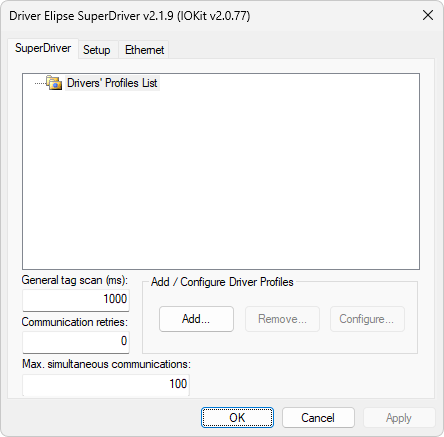
SuperDriver tab
The available options on this tab are described on the next table.
Available options on the SuperDriver tab
Option |
Descrição |
|---|---|
Drivers' Profiles List |
A tree structure aiming to display the list of Profiles of Drivers |
General tag scan (ms) |
Time, in milliseconds, of a scan period relative to all Tags on the reading list and universal to all Slave objects. This means that all Slaves obey a cyclic reading of each one of the Tags by this value. The expiration of the general scan time always generates a reading request to all Tags on the list of each Slave |
Communication retries |
Configures the number of communication retries. A Slave object retries communication while there are Tags with unsuccessful readings. In each operation mode, Elipse SuperDriver Driver works in a different way relative to this value. For more information, please check topic Operation Modes. The maximum allowed number of retries is 10 |
Max. simultaneous communications |
Configures the maximum limit of communications occurring at the same time. For more information, please check topic Concurrent Communication. When reaching this value, all Slaves that must communicate remain on a waiting list and start communicating as the current communications are finished. This value must be taken into account by the physical limitations of the computer's processor that executes a system. The minimum configurable value is 1 (one) and the maximum value is 750. The best value to configure varies according to the capacity of the system's processor when performing parallel tasks, therefore the maximum possible value is not always the optimal value for a system, as in a directly proportional relationship. The optimal value can be obtained through testing with concurrent readings of a number of Slaves greater than the configured value |
Add/Configure Driver Profiles |
Allows adding, removing, and configuring Driver Profiles. For more information, please check topic Profile Configuration |
Click OK to confirm the listed configurations and close this window.