The configuration options available on the configuration window are also accessible in Offline mode, at run time, using the Strings described on topic Configuring Properties Offline. The next figure shows specific configurations for this Driver on the Ping tab.
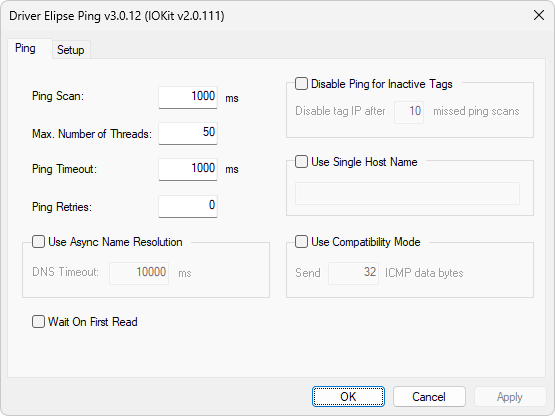
Ping tab
This tab is specific to this Driver and its configuration options are described on this topic. On the Setup tab, users must select the None item in the Physical Layer option and users can also enable log generation. All other options for IOKit library are ignored by this Driver.
The available options on the Ping tab are described on the next table.
Available options on the Ping tab
Option |
Description |
|---|---|
Ping Scan |
Defines an internal scan time for each Tag, in case of asynchronous or multi-threaded ping commands |
Max. Number of Threads |
Defines the maximum number of threads to create. If this value is greater than the number of Tags in the application, this Driver creates a thread per Tag. Otherwise, the maximum number of threads is given by this value. If this value is configured as 0 (zero), ping commands are executed synchronously, in the same reading thread of each Tag. Please check the next note for more information about this option |
Time-out of a ping command |
|
Number of times this Driver resends ping requests at each occurrence of a time-out before returning 0 (zero) in the Value field of Simple Ping Tags |
|
Use Async Name Resolution |
This option enables resolving host names asynchronously, which allows configuring a time-out for that operation by loosing some performance. Use this option only in cases where a DNS (Domain Name System) operation may last longer or fail frequently |
DNS Timeout |
Time-out to resolve host names, used in case the Use Async Name Resolution option is enabled |
Wait On First Read |
If this option is enabled, this Driver waits to perform the first ping command during the first read of each Tag, so that it returns a value. If it is disabled, the first reading of a Tag only schedules a ping command and the operation returns no value and does not change any Tag property in an application. A Tag only starts returning values when the first ping command is performed by this Driver. Users must leave this option disabled preferably, because it tends to improve performance |
Disable Ping for Inactive Tags |
This option allows this Driver to set Tags to an inactive status in their internal scans, if an application is not requesting a reading during a configurable scan period. In an inactive status, the IP address or the host name referring to a Tag is no longer used in internal scans of this Driver. A Tag goes to an active status as soon as a new reading request is received from an application |
Disable tag IP after n missed ping scans |
Informs this Driver how many internal scans unread by an application must occur before a Tag is considered inactive |
Use Single Host Name |
This option must be used only for Elipse SCADA. Using this option limits an application to use a single Tag. Its text box allows defining a host name used for an application's single Tag, which must be defined with N1, N2, N3, and N4 parameters as 0 (zero). For Elipse E3, Elipse Power, or Elipse Water, leave this option disabled and use the Device property of each Tag to define a host name. Please check the next note for more information about this option |
Use Compatibility Mode |
This option allows defining a certain number of data bytes to send in a frame of an echo request of ICMP (Internet Control Message Protocol) protocol. The default value of this option is disabled. Please check the next note for more information about this option |
Send n ICMP data bytes |
This option indicates the number of data bytes to send in a frame of an echo request of ICMP protocol, if the Use Compatibility Mode option is enabled. Please check the next note for more information about this option |