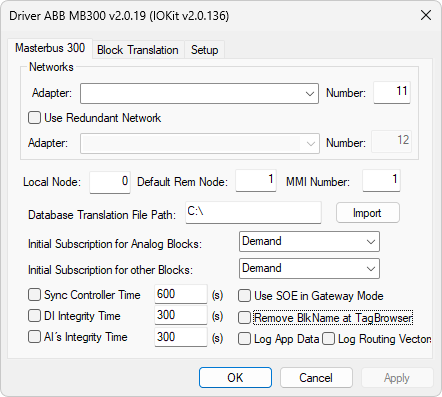
Masterbus 300 Tab
The available options on this tab are described on the next table.
Available options on the Masterbus 300 tab
Option |
Description |
|---|---|
Networks |
Contains options to select one or two NICs (Network Interface Cards), used in MB300 redundant networks. In this case, select the Use Redundant Network option |
Adapter |
Lists all NICs available on a computer. Select the NIC linked to every ABB network. Notice that a NIC's MAC (Media Access Control) address must have the format 00:00:23:00:XX:00, in which XX is a Driver's network address on the ABB network, and it must be different from all other network nodes. Please check topic Changing the Address of a Network Interface Card for information on how to change a NIC's MAC address |
Network |
Indicates the local network number. The default value for a single network is 11 and for a redundant network is 12 |
Local Node |
Indicates the local node number, in decimal notation, and it must match a NIC's MAC address "00:00:23:00:XX:00", in which XX is the node in hexadecimal notation. For example, if users want this Driver's node to be 31 in decimal notation, the MAC address must be equal to "00:00:23:00:1F:00" |
Default Remote Node |
The Device parameter available in each Tag is used to store node information users want to access. If a Tag's Device parameter is set to 0 (zero), then this Driver uses the Default Remote Node instead |
MMI Number |
Used for commands, it indicates whether a Driver station represents MMI Number 1 (one, default) or 2 (two) |
Informs a folder in the computer where this Driver saves files containing a block database description of every network node. These files are identified by the name MB300_XX.INI, in which XX is the node address in decimal notation. Please check topic MB300 INI File for information about this file's internal format |
|
Import |
Imports .bax files with system block configuration |
Initial Subscription for Analog Blocks |
Defines a standard initial data reading mode for AI, AO, GENUSD, GENCON, PIDCON, DAT, MANSTN, and MOTCON blocks. This reading mode can be changed by writing a value to the UpdateMode Tag available on each block. Possible values are Dummy: This Driver waits for event messages from a controller to update block values, Demand: One single reading is performed at start up, Event: If event handling is enabled for the object on the controller, an update is received every time the status word changes or an order is performed, Cyclic 1,3,9(s): Creates cyclic subscriptions of 1 (one), 3 (three), and 9 (nine) seconds, respectively. An update is received until an unsubscribe is performed, by writing 0 (zero) to the UpdateMode Tag, or Demand + MinCycle 1,3,9(s): Starts with a full reading of all block contents using a demand reading (only once) and then creates a cyclic subscription of 1 (one), 3 (three), and 9 (nine) seconds, respectively. An update is received until an unsubscribe is performed, by writing 0 (zero) to the UpdateMode Tag |
Initial Subscription for Other Blocks |
Same as the previous option, but for all other blocks. This reading mode can be changed by writing a value to the UpdateMode Tag available on each block |
Sync Controller Time |
Users must select this option if they want this Driver to sync a controller's internal clock during this Driver's start up and at regular intervals |
DI Integrity Time (s) |
If enabled, this option performs a demand update on all DI blocks at the specified period. This works as a DI Integrity check, as depending on a controller's CPU load, some read requests may not be sent |
AI Integrity Time (s) |
If enabled, this option performs a demand update on all AI blocks that were not updated during the specified period. This works as an AI Integrity check |
Use SOE in gateway mode |
If this option is set, this Driver uses the DI property SOE as the key value for gateway applications. Please check table Available options for the Use SOE in gateway mode option for more information about these conditions. If this option is not set, this Driver uses the DI property SOE as an entry point for SOE (Sequence of Events) log in Elipse E3, Elipse Power, or Elipse Water. In this case, the SOE Tag indicates all events as transitions from 0 (zero) to 1 (one), with the corresponding timestamp. The conditions are independent of the Normal Position property. ALARM_ON, EVENT_ON, and UNACK_ON are equal to 1 (one) and CLEAR_PERSIST, ALARM_OFF, and EVENT_OFF are equal to 0 (zero) |
Remove BlkName at TagBrowser |
Removes the BlockName property from blocks when importing from Tag Browser. If this option is not selected, that property is included |
Log Application Data |
Logs messages from the main protocol containing data or acknowledgments |
Log Routing Vectors |
Logs broadcast messages received from other nodes and sent by this node, known as routing vectors. These messages are exchanged frequently and are used to identify active nodes on a network |
Available options for the Use SOE in gateway mode option
Event |
Normal Position |
SOE Value |
|---|---|---|
ALARM_ON |
0 (zero) |
1 (one) |
ALARM_ON |
1 (one) |
0 (zero) |
ALARM_OFF |
0 (zero) |
0 (zero) |
ALARM_OFF |
1 (one) |
1 (one) |