To configure this Driver, use the APR03 tab, shown on the next figure.
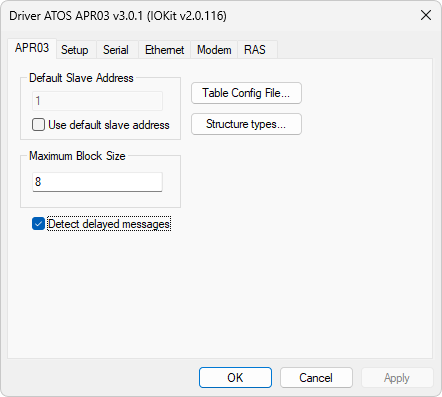
APR03 tab
Available options on the APR03 tab
Option |
Description |
|---|---|
Default Slave Address |
Indicates the value of the default slave address. This option is enabled only if the Use default slave address option is selected |
Use default slave address |
Enables using the value defined in the Default Slave Address option as the destination address of a command for all Tags, regardless of the value configured in the N1 or B1 parameters |
Maximum Block Size |
This option is only used in Elipse E3, Elipse Power, or Elipse Water if a Tag's EnableReadGrouping property (Superblocks) is enabled. It informs the maximum number of data bytes in each reading block. Adequate values for each device model are described on the table Limits for each I/O Block |
Detect delayed messages |
This option allows this Driver to not return an error when detecting a delayed message. Please check the next note for more information about this option |
Opens a configuration file with tables for reading data by events |
|
Model |
Limit |
|---|---|
Devices from series MPC1200, MPC1600, MPC2002, MPC4004.01, MPC4004.02, MPC4004.04, MPC4004.09, MPC4004.11, MPC4004.12, MPC4004.11L, MPC4004.12L, EXPERT, and all controllers from series MPC2200 |
8 (eight) bytes |
Devices MPC4004.04B, MPC4004.05B, MPC4004.06B, MPC4004.09B, MPC4004.05E, MPC4004.06E, MPC4004.09E, MPC4004.05R, MPC4004.06R, MPC4004.09R, MPC4004.05T, MPC4004.06T, MPC4004.09T, and module 4004.72 |
16 bytes |
Module 4004.72R |
32 bytes |
The Detect delayed messages option is useful when the TCP/IP protocol (Ethernet) is used as the physical layer of IOKit library. In this case, it is a common situation when unwanted delays occur in a device's response, specially if the physical connection includes radio links. Therefore, this Driver may send a first request and does not receive a response in the expected time, thus generating a time-out error. Instead of sending a new request, this Driver can receive the delayed message from the previous request. If this option is not enabled, a syncing can happen, thus all subsequent requests get the delayed return from the previous request as a response. When this option is enabled, this Driver does not return an error immediately after detecting a delayed message, but executes a new attempt to get the correct response. If a new message is received before a time-out occurs, and that response is valid, it is returned to the application. Otherwise, this Driver starts discarding all bytes received up until the time-out, thus clearing the I/O channel and preventing the propagation of errors. |