The configurations of this Driver are performed on the ABS tab, shown on the next figure.
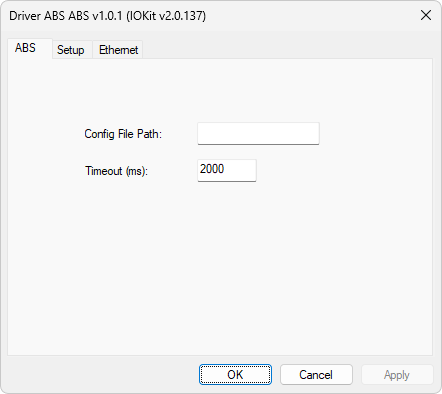
ABS tab
The available options on this tab are described on the next table.
Available options on the ABS tab
Option |
Description |
|---|---|
Config File Path |
Folder to which are saved the configuration or device identification file, the ABS.ini file, and the reading pointer file of the Datalogger of each device, the ABSLoggerPointers.ini file |
Timeout (ms) |
Maximum time to wait, in milliseconds, for a reading or writing operation to be considered in failure |
ABS.ini File
On the folder informed in the Config File Path option, users must create a file, in Text format, with the identification and configuration of modems, so that this Driver refuse connections from modems not registered. This file must be named ABS.ini, and each line must contain the definition of a device, in the format ID;DeviceAddress;Protocol, in which:
•ID: A decimal number identifying a modem, used in Tags as the address of that modem
•DeviceAddress: Unique code of a device, a value with 8 (eight) characters in hexadecimal format, configured in a device in the Host Login property
•Protocol: Communication protocol. Possible values are TCP, RTU, or ASC
The next code contains an example of this file.
1;0B230ACC;TCP
2;0B230ACD;TCP
ABSLoggerPointers.ini File
This file is automatically generated when stopping the execution of this Driver, containing a line for each device, in the format ID;SavePointer;CurrentLoggerBlock, in which:
•ID: A decimal number identifying a modem, defined in the ABS.ini file
•SavePointer: Indicates whether users want to save a Logger's pointer. Possible values are 0 (zero) or 1 (one). This value is defined in the N4 parameter of the Block Tag for Reading Events
•CurrentLoggerBlock: Position or address of the last reading of the stack of events of a Logger
All offline properties must be configured using PLC Tags in String format using the N1 parameter equal to -1 (minus one), the N2 parameter equal to 0 (zero), the N3 parameter equal to 0 (zero), and the N4 parameter equal to 3 (three). For more details and examples, please check topic Documentation of I/O Interfaces.