Tags are configured using the Device and Item properties and the N2 and N4 parameters.
•Device: Indicates the address of a device as defined in the ABS.ini file, followed by a colon (:), such as 1:. The Modbus address is fixed in 0 (zero)
•N2: Indicates the type of a Tag. Possible values are described on the next table
Possible values for the N2 parameter
N2 |
Name |
Description |
|---|---|---|
0 |
User Tags |
Normal Tags with real-time readings and writings, according to the address defined in the Item parameter |
9999 |
State |
Indicates whether a device is in active communication. Possible values are 0 (zero, inactive) or 1 (one, active) |
100 |
Event Reading (Block Tag) |
Users must create a Block Tag with a Block Element for each channel configured in a Logger. Each analog channel occupies a Block Element, and if a Logger is also configured to store digital inputs and outputs, they occupy the first 2 (two) Block Elements, and the next Block Elements correspond to each one of the other analog channels configured. The timestamp of each record is returned in the TimeStamp property of this Block Tag. To process each one of the records returned in this Block Tag, such as for storing on a Historic object, users must use a script on the OnTagRead event of this Block Tag |
•N4: Used only for the Event Reading Block Tag, with the N2 parameter equal to 100, informing the type of management of a Logger. Possible values are 0: Does not save the pointer from the last reading when stopping this Driver, 1: Saves the pointer from the last reading when stopping this Driver, or 2: Deletes events after reading, and therefore does not save the pointer from the last reading when stopping this Driver because there is no need to store it
•Item: If the N2 parameter is equal to 0 (zero, Users Tags), inform the address and operation to perform by this Tag, with the following syntax:
<addressing space><address>[.<type>[<size of type>]][.<byte order>][/bit]
Available options for the Addressing Space parameter
Addressing Space |
Mnemonic |
Native Data Type |
Function |
Comments |
|---|---|---|---|---|
Holding Register |
hr |
16-bit Word |
Functions 03 and 16 |
Functions 03 and 16 are the most used of Modbus class 0 (zero) protocol |
Single Holding Register |
shr |
16-bit Word |
Functions 03 and 06 |
Function 06 writes to the same registers of function 16, the difference is that function 16 can write to Block Tags, while function 06 writes to one register at a time, but with less overhead |
Coil |
cl |
Bit |
Functions 01 and 15 |
|
Single Coil |
scl |
Bit |
Functions 01 and 05 |
Function 05 writes to the same registers of function 15, but it cannot write to Block Tags, therefore with less overhead |
Discrete Input |
di |
Bit |
Functions 02 and None (read-only) |
|
Input Register |
ir |
16-bit Word |
Functions 04 and None (read-only) |
|
Exception Status |
es |
Byte |
Functions 07 and None (read-only) |
|
File Register |
fr |
16-bit Word |
Functions 20 and 21 |
|
The Address parameter is a number identifying the address of an item, register or bit, to read or write inside the defined addressing space. Values can be provided in decimal, hexadecimal, or octal format. For values in decimal, there is no need to add a prefix, or users can use the &d prefix. For values in hexadecimal, add the &h prefix, such as &hFFFF. For the octal format, use the &o prefix, such as &o843. This address may have an offset, relative to the address actually sent in a communication frame, which depends on the convention used by the manufacturer.
The parameters described next, on the other hand, are optional and used for extension to the default protocol or for compatibility with devices not fully adherent to protocol, also detailed later.
The Type parameter defines how bytes of a data area of a communication frame must be interpreted. If omitted, the default data types defined by the protocol are used for the functions in use, that is, Word for functions to access registers and Bit for functions to access digital data, Coils and Discrete Inputs.
Supported data types
Data Type |
Mnemonic |
Alias |
|---|---|---|
Char |
char |
ch |
Byte |
byte |
by or u8 |
Int8 |
int8 |
i8 |
Int16 |
int16 |
i16 |
Int32 |
int32 |
i32 |
Word or UInt |
word |
u16 |
DWord or ULong |
dword |
u32 |
Float |
float |
f |
Float_GE |
float_GE |
fge |
Double or Real |
double |
d |
String |
string |
s |
The Size of type parameter is only necessary to specify for data types with variable size, such as BCD and String. The value of this parameter indicates the size of a data type, in bytes.
The Byte order parameter is a mnemonic indicating the order of bytes for number values. If this parameter is omitted, the protocol default is used, with the most significant bytes first in the communication frame, which is equivalent to b0, called Big Endian. The next table indicates which swap operations, that is, Swap Bytes, Swap Words, and Swap DWords, are performed for each sorting mnemonic, from b0 to b7.
Swapping operations
|
Swap Bytes |
Swap Words |
Swap DWords |
Alias |
Alias 2 (Swaps) |
Sorting |
|---|---|---|---|---|---|---|
b0 |
|
|
|
msb |
- |
by7 by6 by5 by4 by3 by2 by1 by0 |
b1 |
X |
|
|
- |
sb |
by6 by7 by4 by5 by2 by3 by0 by1 |
b2 |
|
X |
|
- |
sw |
by5 by4 by7 by6 by1 by0 by3 by2 |
b3 |
X |
X |
|
- |
sb.sw |
by4 by5 by6 by7 by0 by1 by2 by3 |
b4 |
|
|
X |
- |
sdw |
by3 by2 by1 by0 by7 by6 by5 by4 |
b5 |
X |
|
X |
- |
sb.sdw |
by2 by3 by0 by1 by6 by7 by4 by5 |
b6 |
|
X |
X |
- |
sw.sdw |
by1 by0 by3 by2 by5 by4 by7 by6 |
b7 |
X |
X |
X |
lsb |
sb.sw.sdw |
by0 by1 by2 by3 by4 by5 by6 by7 |
The Bit parameter allows returning a specific bit of an integer value, and it is obviously needed only in Modbus functions that return integer values, or Words. Usually, it is recommended to no use that feature, prefer an application's bit mapping. Bit 1 (one) is the least significant and, the greater the value, the more significant is that bit. The maximum allowed value obviously depends on the size of the data type, and it is currently 64 for Double data types. This parameter corresponds to the old Use Bit Mask option of number configuration.
When opening Tag Browser window, the main Tags offered by a device are already available, according to the next figure.
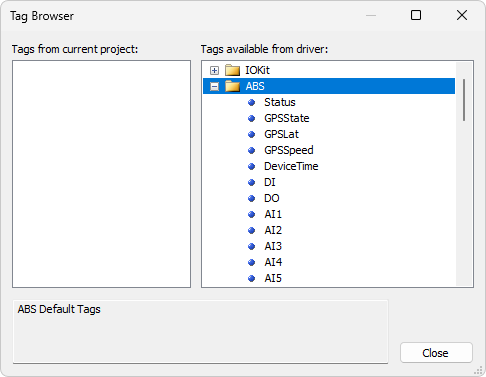
Tag Browser window