This tab displays a tree with two groups of items to fill in. The Target Devices item is used to insert connections with remote devices that communicate with this Driver, and users must configure at least one connection to establish a successful communication.
The Memory references item is used to add references to memory addresses, which are divided into physical inputs (Inputs %I), physical outputs (Outputs %Q), and general usage memories (Flags %M).
The next tables show instructions on how to fill in these groups of items.
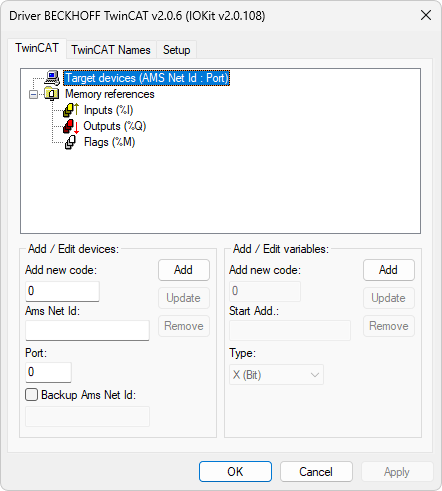
TwinCAT tab
The available options on this tab are described on the next table.
Available options on the Target devices group
Option |
Description |
|---|---|
Add new code |
Fill it in with an index number, a code between 0 (zero) and 255. In case there is already a connection with this number, it is automatically selected on the table and its values are loaded to the edition fields. This code is a reference to a connection with a PLC or any other Beckhoff device on Tags, that is, the index configured on the list is the one to indicate on Tags by the N2/B2 parameter |
Ams Net Id |
Configure here the Ams Net Id of the main destination device. It must be formed by eight numbers separated by dots |
Port |
Ams Net Id port to which this Driver must connect |
Backup Ams Net Id |
Select the check box and configure here the Ams Net Id of the backup destination device, in case of a redundancy architecture. It must be formed by eight numbers separated by dots |
Available options on the Memory references group
Option |
Description |
|---|---|
Add new code |
Fill it in with an index number, a code between 0 (zero) and 65535. In case there is already a memory with this number, it is automatically selected on the list and its values are loaded to the edition fields. This code is a reference to the address of a variable, that is, the index configured on the list must be the one indicated on Tags for reading or writing variables by address by the N3/B3 parameter |
Start Add |
Variable's initial address. It is only allowed to insert numbers in decimal notation. In case of a Bit data type, two numbers must be inserted and separated by a dot, the second number indicating the position of the bit to read, such as "100.1", that is, bit 1 (one) of memory address 100 |
Type |
Memory format. Possible values are X (Bit), B (Byte), W (Word), D (Double Word), or F (Float). Properties of these formats can be checked on the table Types of Variables. The type of memory may also vary between Physical input (%I), Physical output (%Q), or Internal memory (%M), depending on the selected item on the tree |
The options to manipulate data on these lists are the following:
•Add: Adds parameters
•Update: Changes parameters already listed
•Remove: Completely removes a row of parameters
To add a reference to a destination device, select the Target Devices  item, fill in the fields according to table Available options on the Target devices group, and then click Add.
To add a reference to a memory field, select the icon of a type ( for a physical input,
  for a physical output, or
  for an internal memory), fill in the fields according to table Available options on the Memory references group, and then click Add.
To change or remove any of the existing references, select the item representing it and then click Update or Remove.