The configuration of this Driver must be performed on the window shown on the next figure.
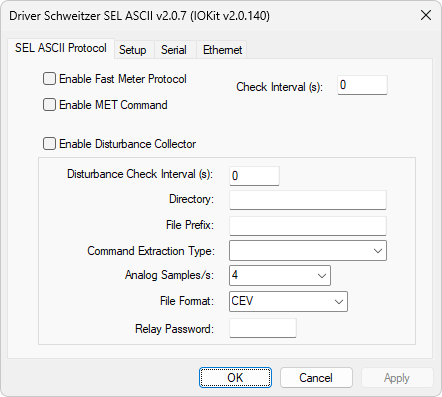
SEL ASCII Protocol tab
The available options on this window are described on the next table.
Available options on the SEL ASCII Protocol tab
Option |
Description |
|---|---|
Enable Fast Meter Protocol |
Requests measurement values using the SEL Fast Meter protocol |
Enable MET Command |
Instructs this Driver to request measurements using MET and MET B commands |
Check Interval (s) |
Interval, in seconds, to request new measurement readings with Fast Meter protocols or MET commands |
Enable Disturbance Collector |
Instructs this Driver to request and collect oscillography files |
Disturbance Check Interval (s) |
Inform an interval to check for new oscillography files |
Directory |
Inform a directory where files are saved |
File Prefix |
Inform a base prefix for files. The name of a file is formed by Prefix + DisturbanceTime.Extension (CEV, CFG, DAT, or HDR). Extensions are defined in the File Format option |
Command Extraction Type |
Depending on the model of SEL relay, different extract commands are supported. The available options are described on the next table |
Inform the number of analog samples. The available options are 4 (four), 8 (eight), 16, or 32 samples per second, depending on the capacity of a relay. Used only with commands in the Samples/s format |
|
File Format |
Extension for files. The available options are CEV (SEL proprietary in ASCII format) and COMTRADE 1999. When selecting the COMTRADE 1999 option, 3 (three) files are generated with CFG, DAT, and HDR extensions |
Relay Password |
Password used to enter the transfer mode with a relay. Default password is "OTTER" |
Available options for the Command Extraction Type option
Command Format |
Family of Supported Models |
|---|---|
Simple (Old) - CEVENT n |
Command for simple extraction, such as "SEL 2431" |
Simple - CEV n |
Command for simple extraction used for most models, using a default sampling rate |
Command for extraction specifying the number of samples per second. The number of samples can be informed in the Analog Samples option. SEL 3XX and 6XX devices can use this command |
|
Raw - CEV n R |
Command for extraction with the highest possible sampling rate (Raw). Used in 5XX and 7XX devices |
Raw2 - CEV R n |
Command for extraction with high sampling rate for 6XX devices |
Large - CEV n L |
Command for extraction with high sampling rate for 4XX devices |