This Driver's [P] configuration parameters are not used. All settings are performed on the configuration window. For more information about the Setup, Serial, Ethernet, Modem, and RAS tabs, please check topic Documentation of I/O Interfaces. The SCPI tab, shown on the next figure, contains specific settings for this Driver.
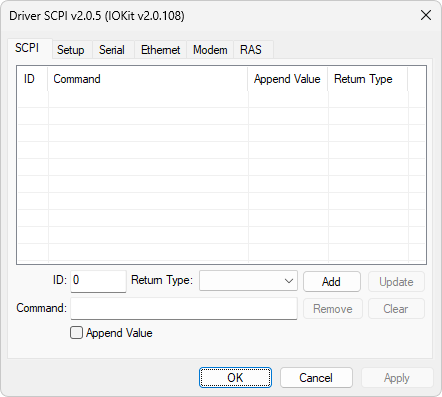
SCPI tab
On this tab, users can build a list of SCPI commands. By using the Add, Update, Remove, and Clear options, users can add, update, remove, or clear all registered commands, respectively. The available options on this tab are described on the next table.
Available options on the SCPI tab
Option |
Description |
|---|---|
ID |
Unique identifier of a command, user-defined |
Command |
SCPI command |
Append Value |
With this option selected, this Driver concatenates the value of a Tag with an SCPI command, as a parameter. The value of a Tag must have a String data type for this feature to work. NOTE: Used only with writing commands |
Return Type |
Expected return data type for an SCPI command. Supported data types are Double (64-bit floating point), Integer (32-bit integer), ASCII (text), or Auto, in which this Driver automatically detects which data type |
Configuring commands on the SCPI tab is optional. An SCPI command and its respective parameters can be configured directly in an I/O Tag. For more information, please check topic Configuration by Strings.