The [P] configuration parameters of this Driver are not used. All configurations are performed on the configuration window, shown on the next figure.
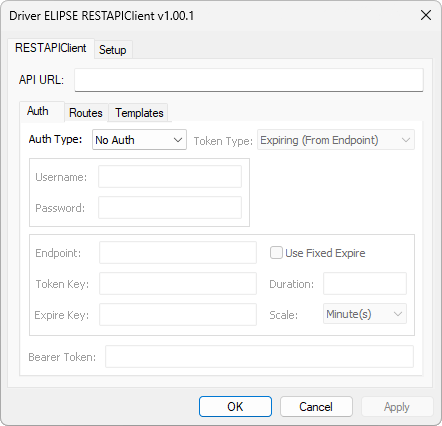
RESTAPIClient tab
The available options on the RESTAPIClient tab are described on the next table.
Available options on the RESTAPIClient tab
Option |
Description |
|---|---|
API URL |
Path of an API (Application Programming Interface), formed by a protocol, HTTP or HTTPS, by a domain, such as "https://api.example.com", and, when needed, by a TCP/IP port, such as "https://api.example.com:8080", defined before the specific routes that identify the resources of an API |
Auth |
Select this tab to configure the authentication of an API. For more information, please check table Available options on the Auth tab |
Routes |
Select this tab to configure the specific routes of an API. For more information, please check table Available options on the Routes tab |
Templates |
Select this tab to configure the templates in JSON format for requests and responses from an API. For more information, please check table Available options on the Templates tab |
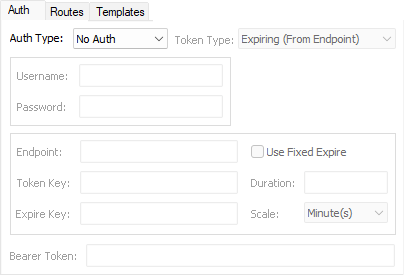
Auth tab
The available options on the Auth tab are described on the next table.
Available options on the Auth tab
Option |
Description |
|---|---|
Defines the type of authentication used by this Driver. The available options are No Auth, Basic Auth, or Bearer Token |
|
Token Type |
Defines the type of Bearer Token. This option is only enabled when the Auth Type option is configured as Bearer Token. The available options are Expiring (From Endpoint), Non-Expiring (From Endpoint), or Non-Expiring (Provided) |
Username |
Defines the name of a user. Available only for authentications of type Basic Auth or Bearer Token with types Expiring (From Endpoint) or Non-Expiring (From Endpoint) |
Password |
Defines the password of a user. Available only for authentications of type Basic Auth or Bearer Token with types Expiring (From Endpoint) or Non-Expiring (From Endpoint) |
Endpoint |
Defines the endpoint used to retrieve a Bearer Token, such as "/auth/token". Available only for the authentication of type Bearer Token with types Expiring (From Endpoint) or Non-Expiring (From Endpoint) |
Token Key |
Defines a key in the endpoint's response JSON-type file that contains a Bearer Token, such as "access_token". Available only for the authentication of type Bearer Token with types Expiring (From Endpoint) or Non-Expiring (From Endpoint) |
Expire Key |
Defines a key in the endpoint's response JSON-type file that contains the duration of a token, in seconds, such as "expires_in". Available only for the authentication of type Bearer Token with type Expiring (From Endpoint) |
Use Fixed Expire |
Defines a fixed time of expiration of a manually-provided token, such as 3600 seconds. Selecting this option deactivates the Expire Key option. Available only for the authentication of type Bearer Token with type Expiring (From Endpoint) |
Duration |
Defines the validation time of a token, which must be a number value. Available only when the Use Fixed Expire option is selected |
Scale |
Defines a time unit used for the Duration option. The available options are Second(s), Minute(s), Hour(s), or Day(s). Available only when the Use Fixed Expire option is selected |
Bearer Token |
Defines a fixed token used in authentication. Available only for the authentication of type Bearer Token with type Non-Expiring (Provided) |
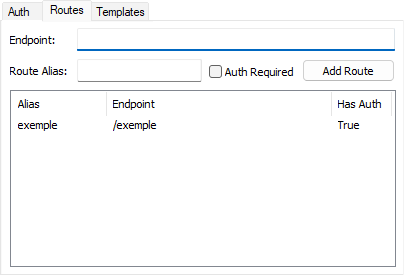
Routes tab
The available options on the Routes tab are described on the next table.
Available options on the Routes tab
Option |
Description |
|---|---|
Endpoint |
Defines the endpoints used in requests. Each endpoint must start with a slash character followed by a path, such as "/api/users". Users can also define dynamic segments in an endpoint, which are then replaced by values configured via Tags in a request. These segments must be indicated by colons, such as "/api/company/:companyId/user/:userId" |
Route Alias |
Defines an alias for a route. This alias is used later to link Tags from an application to a specific route. The value of this option is case-sensitive |
This option indicates that a specific route uses the authentication method configured in the Auth Type option of the Auth tab |
|
Add Route |
Adds a route to the table of configured routes |
Right-clicking a route displays the Edit option, which opens the Params Config window, and the Delete option, which allows removing the selected route. Double-clicking a route also opens the Params Config window, shown on the next figure, which allows configuring specific parameters of that route.
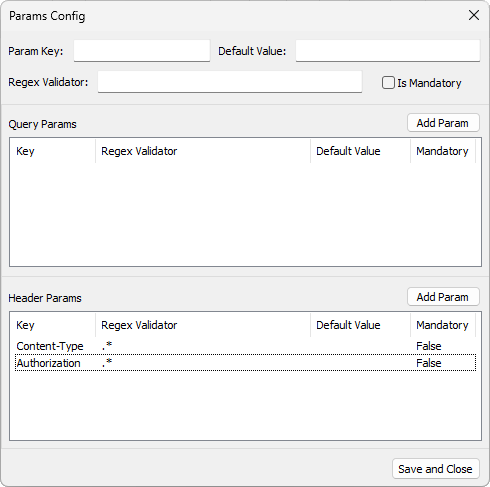
Params Config window
The available options on the Params Config window are described on the next table.
Available options on the Params Config window
Option |
Description |
|---|---|
Param Key |
Defines the name of a parameter used in a request |
Default Value |
Defines a default value for a parameter. If no value is provided, this option is considered as empty |
Allows defining a regular expression to validate a value assigned to a parameter, if needed |
|
Is Mandatory |
Selecting this option prevents sending a request if a parameter is not configured or if it is configured with an empty value |
Add Param |
Adds a new parameter to the Query Params or Header Params tables. Each one of these tables has its corresponding Add Param option, which allows inserting a query parameter or a header parameter, respectively |
Save and Close |
Saves the configured data and closes this window |
Right-clicking a parameter on any of these tables displays the Delete option, which allows removing the selected parameter.
The Content-Type and Authorization parameters are automatically inserted as header-type parameters on the Header Params table. These parameters cannot be removed nor configured later using Tags.
In case of using a type of authentication different from the available options on the Auth tab, such as using an API key, a route can be configured to not use authentication, that is, deselect the Auth Required option, and in this case the header parameters can be configured, defining the respective values of the Default Value column both manually and at run time using Tags.
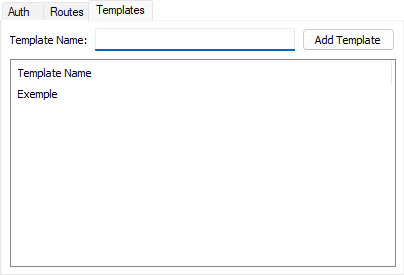
Templates tab
The available options on the Templates tab are described on the next table.
Available options on the Templates tab
Option |
Description |
Template Name |
Defines the name of a template, in JSON format, that is used for requests and responses from an API |
Add Template |
Adds a template to the table of configured templates |
Right-clicking a template displays the Edit option, which opens the Template Config window, and the Delete option, which allows removing the selected template. Double-clicking a template also opens the Template Config window, shown on the next figure, which allows configuring a template in JSON format, according to the standard syntax of this format described in the next topic.
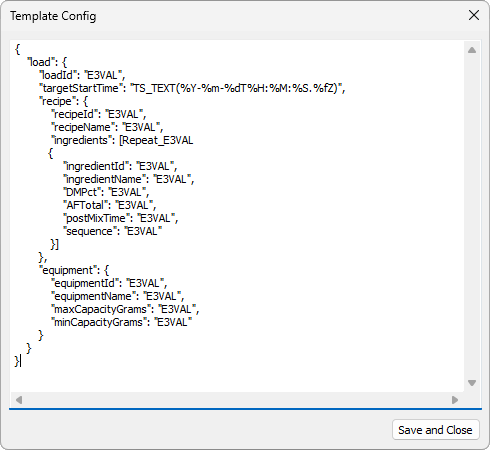
Template Config window
The available option on the Template Config window is Save and Close, which saves the configured data and then closes this window.