For gateway applications, in which data must be sent from this Driver to other protocols, such as DNP 3.0 or IEC 104, there may be situations in which, in case of restarting an application or switching to a redundant application, or in Hot-Standby, events are duplicated or lost. This may occur when an event was received by this Driver and sent, but it was not yet received by the remote Master, according to the example of the next figure.
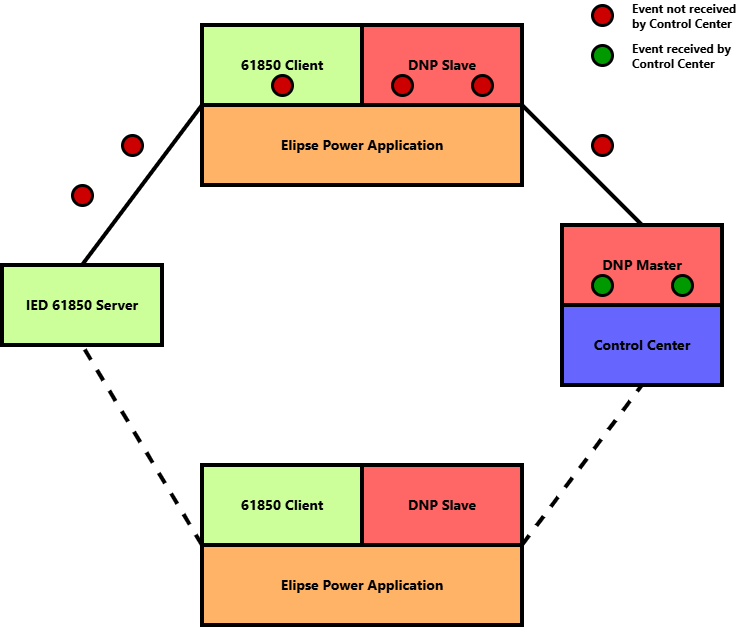
Configuration of a Gateway
The previous image shows that there may be events transferred and pending transmission in the several components, such as IEC 61850 Server, IEC 61850 Client, DNP Slave, or DNP Master. This queue of pending events can be bigger or smaller depending on the configuration of these components and the network architecture, among other factors.
When there is a switch from Gateway A to Gateway B, for example, the events pending transmission can be both lost or duplicated, depending on the configuration of an application. This because the 61850 protocol allows receiving again Buffered Reports messages, by configuring the EntryID field of each Report, which is a unique identifier of each message sent.
This Driver already contains a feature to generate files with the last EntryID of each Report, which is used to enable Reports when this Driver starts again. However, these EntryIDs are updated based on the instant messages were received by this Driver, and not by actually receiving data from an external element. In the previous example, in the Control Center.
So, when enabling the Gateway feature in the Wait for Gtw Ref on Startup, this Driver waits that an Elipse Power application informs a String that represents the address of a Tag in another Driver, such as DNP or IEC 104 Slave. When this other Driver receives a confirmation that an event was delivered to Control Center, DNP, or IEC 104 Master, and therefore this Driver can place EntryID controls ahead so that, if there is a new switch, the flow of events keep going from that last point., thus avoiding loss or repetition of events.
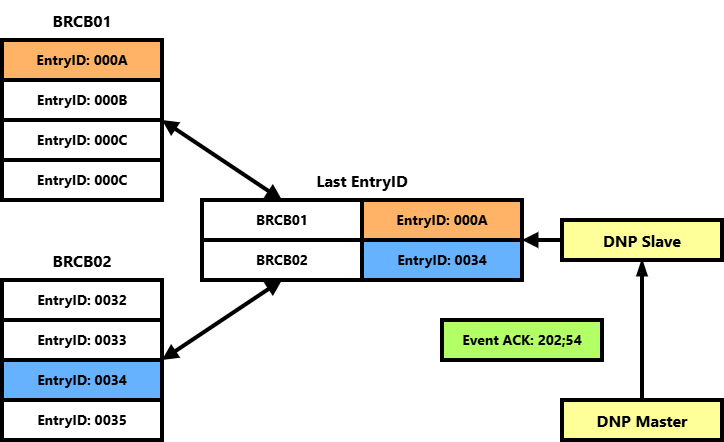
Managing EntryIDs
The steps to configure this feature are the folloing:
1.Enable the Check BRCB Entry ID, R/W Entry ID File (.EID) and Wait for Gtw Ref on Startup options on the Reports tab. Also, if an IED use the same Reports for both gateways, users must evaluate using a fixed list of Reports in the User Defined Report List option, thus avoiding a redundant application trying to enable other Reports that are not expected.
2.In this Driver, create a Tag called "FinishedGtwRef" and two Block Tags called "GatewayRef" and "GatewayEventOK. These Tags are described on topit Tag Reference - Internal Tags.
3.Using a DNP Slave Driver as an example, create a Block Tag with the N2 parameter equal to -22, which receives on the OnRead event a list with all events confirmed by a DNP Master. Please check the documentation of DNP Slave and Master Driver for more information.
4.Tags in DNP Slave Driver must receive Links from Tags of this Driver. For example, a Tag to a DNP 3205 object with index 0 (zero) is fed by a phase A current coming from this Driver.
5.An application, when starting, must initialize references by passing a text that represents the DNP address for each Tag of this Driver needed to perform a control of EntryIDs. But this writing can only be performed at the moment this Driver is with the Logical Devices created, otherwise this writing fails. To solve this problem, the next example shows an Internal Tag that tries to send a configuration every 5 (five) seconds. When this writing is successful, there are no more tries. At the end of this process, the FinishedGtwRef Tag is written.
6.Also in this example, the reference String was retrieved from joining the object and variation of DNP Tag plus the index. In the DNP Slave Driver, these values are in the N3 and N4 parameters, respectively.
•Initial value of Tag InitGateway: True (Boolean)
•Event WhileNotOK: Expression: Value Repeat Event every 5000 ms
Sub InitGateway_WhileNotOK()
Set DNPSlave = Application.GetObject("DNPSlave")
Set Ref = Application.GetObject("IEC61850").Item("GatewayRef")
bFirst = FALSE
For Each tag in DNPSlave
If TypeName(tag) = "IOTag" Then
If tag.N2 = 1 Then
Source = tag.Links.Item("Value").Source
Set s = Application.GetObject(Source)
arr = Split(s.ParamDevice,":")
Ref.Item("IEDName").Value = arr(0)
Ref.Item("LDName").Value = arr(1)
Ref.Item("Object").Value = s.ParamItem
Ref.Item("Ref").Value = CStr(tag.N3) + ";" + CStr(tag.N4)
If NOT bFirst Then
bFirst = Ref.Write(1) 'sync
If NOT bFirst Then Exit Sub
Else
Ref.Write 2 'async unconfirmed
End If
End If
End If
Next
res = Application.GetObject("IEC61850").Item("FinishedGtwRef").WriteEx(2) 'async unconfirmed
If res Then Value = FALSE
End Sub
7.When Block Tag EventOK is read in DNP Slave Driver, this means that a new event was received by the DNP Master Driver. The next script get information from this event and sends to this Driver. In the specific case of DNP Slave Driver, this Block Tag returns some information about this event, such as object and variation, index, DNP class, value, valid timestamp, and timestamp. All these parameters are sent to this Driver by writing to the Block Tag GatewayEventOK, except DNP class, which is not relevant.
Sub EventOK_OnRead()
Set IECBlock = Application.GetObject("IEC61850.GatewayEventOK")
IECBlock.Item("Ref").Value = CStr(Item("ObjVar").Value) + ";" + CStr(Item("Index").Value)
IECBlock.Item("Value").Value = Item("Value").Value
IECBlock.Item("TSValid").Value = Item("TSValid").Value
IECBlock.Item("Time").Value = Item("Time").Value
IECBlock.Write 2 'async
End Sub
8.In this moment, this Driver places the EntryIDs for the next pending event. To sync EntryIDs with the redundant computer, users must follow the steps indicated on topic Redundancy - Using EID Files.
9.To place the EntryIDs, this Driver uses the following methodology:
•When a new Report is received, checks if any object had a variation in value or quality. If positive, an event is added to an internal individual list per object.
•When an event is confirmed by an external Driver and received by the GatewayEventOK Block Tag, that internal list is compared with the removed event as follows:
•If the timestamp is not valid, that is, a Tag in DNP or IEC 104 Drivers is not using timestamp, all events are removed from that list
•If the timestamp is valid, the events are removed if they are equal or older than the ones received
To avoid unnecessary processing, it is recommended to only add references to Tags that cannot have changes lost or duplicated, typically digital Tags or Tags with simple ou double state with timestamp. Also it is recommended that, in this case, the Datasets linked to the Reports be separated by type of Tag, such as not placing in the same Dataset Digital and Analog Tags, to avoid receiving old analog values without need.