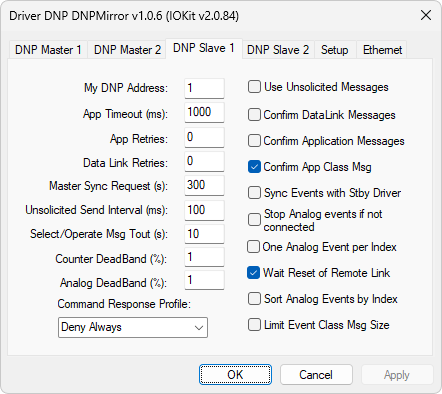
DNP Slave 1 tab
The available options on this tab are described on the next table.
Available options on the DNP Slave 1 tab
Option |
Description |
|---|---|
My DNP Address |
Address of this Driver (Slave). If there are other Slaves on the same link, this value must be unique |
App Timeout (ms) |
Maximum time the Application layer waits for a full response from the Data Link layer. If receiving a request is ongoing by the Data Link layer, this time is automatically extended up until the end of reception by the Data Link layer. The default value of this option depends on the communication rate used. The time-out of the Data Link layer, or byte by byte, is defined by the time-out of IOKit library, defined on the Setup tab. The value of this option must be equal or greater than the time-out of the Data Link layer |
App Retries |
Number of communication retries performed by the Application layer in case of transaction error. The default value of this option is é 0 (zero) |
Data Link Retries |
Number of communication retries performed by the Data Link layer in case of transaction error. The default value of this option is 0 (zero) |
Master Sync Request (s) |
Time interval that this Driver requests to a Master a clock syncing, which may or may not be accepted, according to the Enable Time Sync option. To disable sending, configure this option with the value 0 (zero) |
Unsolicited Send Interval (ms) |
Defines a time interval in which this Driver checks for the existence of events available from Classes 1 (one), 2 (two), or 3 (three) to be sent using unsolicited messages, if the Use Unsolicited Messages option is enabled. The Master side can also enable or disable sending unsolicited messages from a Slave when sending Enable and Disable Unsolicited Message requests, that is, the 20 and 21 functions |
Select/Operate Msg Tout (s) |
Maximum time, in seconds, between a Select command and an Operate command. After this time, the Operate command is no longer accepted by this Driver |
Counter DeadBand (%) |
Informs a dead band, as a percentage, for the purpose of notifying events for counters |
Analog DeadBand (%) |
Informs a dead band, as a percentage, for the purpose of notifying events for analog points |
Command Responsive Profile |
Informs how to handle commands requested to this Driver, that is, the objects 12 variation 1 (one) and 41 variations 1 (one), 2 (two), 3 (three), and 4 (four). The available options are Deny Always: All commands are responded negatively and instantly, with the Status field of a command reporting code 4 (four, unsupported command), Accept Always: All commands are responded positively, with the Status field of a command reporting code 0 (zero, command OK) after the respective command Tag is read by an application. Its purpose is to indicate that the requested command was acknowledged and is going to be processed by an application, or Wait for Application Response: Commands are only responded after the respective Tag is read and written by an application. The purpose of this reading is that an application acknowledges that there is a request from the Master, and it is sent to another Driver or system output. After that processing, an application must write back to the Tag the same value read to indicate that this processing was successful, or a different value if it is not successful |
Informs whether this Driver sends unsolicited messages |
|
Confirm DataLink Messages |
Informs whether this Driver requests confirmation messages on the Data Link layer |
Confirm Application Messages |
Informs whether this Driver requests confirmation messages on the Application layer |
Confirm App Class Msg |
Informs whether this Driver requests confirmation messages for class or event messages. NOTE: This option, for security purposes, is always enabled internally |
Sync Events with Stby Driver |
If there is a second Slave DNP Driver in the same application and it is operating redundantly, that is, the Master side selects in which channel the communication is performed, this option instructs this Driver that, at each confirmation message of class events received, generates a corresponding message to be sent to the redundant Driver. NOTE: This very option must be configured in the second Driver, the Confirm App Class Msg option must be configured in both Driver, and there must be an additional code, or script, to send a message from one Driver to another |
Stop Analog events if not connected |
Stops accumulating analog events when the connection to a Master is interrupted. The current value of each analog Tag keeps being stored. Applies to objects 32 and 33 |
Wait Reset of Remote Link |
Instructs this Driver to only respond communications after receiving a Reset of Remote Link command from a Master. The default value of this option is selected |
Sort Analog Events by Index |
Instructs this Driver to sort analog events, that is, objects 3X with any variation, by the index and not by the timestamp, as the standard for all other events. This allows Sag/Swell-type events from a point to be reported together, enabling the Master side to identify that this is an event of that type |
Limit Event Class Msg Size |
Limits event messages to a fragment of the Data Link layer at a time |