Elipse E3 version 2.0, Elipse Power, and Elipse Water have a tool called Tag Browser, which allows a Driver to help users on creating and configuring Tags.
Tag Browser aims to automate Tag configuration by automatically filling the Item field and the proper size of Elements, if it is a Block Tag.
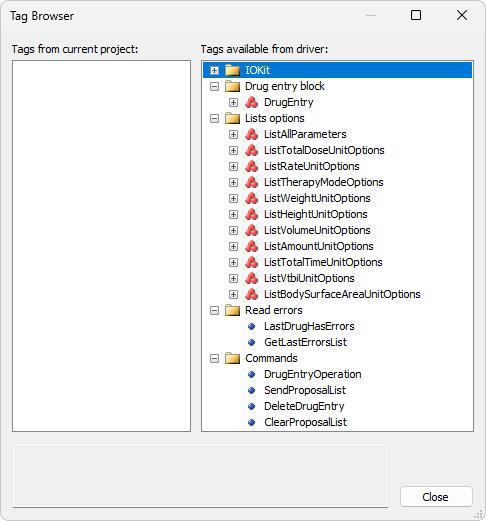
Tag Browser window
The Tags from current project list displays Tags and folders already in the current project. The Tags available from driver list displays a tree with Tags provided by this Driver. To create a new Tag in an application, drag one of the Driver-defined Tags to the desired folder on the current directory. B. Braun AutoProgramming Driver provides the following nodes on this tree view:
•The IOKit node displays Tags available on the IOKit library, grouped into the following categories:
•General: Tags for general use
•Modem: Tags for manipulating communication via modem
•Ethernet: Tags for manipulating communication via Ethernet network
•Parameters: Tags for configuring IOKit parameters
•The Drug entry block node contains a DrugEntry Block Tag for reading and writing
•The Lists options node contains all Block Tags for listing options
•The Read errors node contains all PLC Tags for reading configuration errors
•The Commands node contains all PLC Tags for writing commands