To use AutoProgramming properly in an application, it is important to understand how it works, because this Driver does not have the most common features of all other I/O Drivers.
A B. Braun SpaceCom device provides a feature where an external system can receive the ability to send patient therapy configuration data sets. To do so, a device contains a TCP/IP port dedicated to receive a list of data available in XML (Extensible Markup Language) format, which is commonly known as an XML Document. This XML document can consist of a list of up to 24 therapeutic configurations, and each one of the items on this list can receive a certain set of parameters that determines this configuration. To build an XML document of therapy settings, therefore a certain number of values must be configured by some sort of form editing. An Elipse Software application working with this Driver can then become a management system of patient's therapies, by editing forms and applying those values to create an XML document to send to a certain therapy unit.
Due to the nature of this AutoProgramming feature of B. Braun devices, basically most of the processing activity of this Driver concentrates on the creation of an XML document to send than in the communication process itself.
This Driver's operation can be reduced to the operation of a sequence of three essential ordered writings, that is, a writing of a DrugEntry Block Tag, a writing of an IncludeDrugEntry operation, using a DrugEntryOperation Tag, and a writing of a SendProposalList Tag to command forming and sending an XML document to a remote device. Up to the moment previous to a call to the SendProposalList command, this Driver can be started in offline mode, that is, without starting the communication interface and connecting to the remote device, because before sending data this Driver works only with data in memory. However, by the time the SendProposalList command is called, this Driver must be already in an online status, that is, connected to a remote device.
On this Driver's internal memory there are two types of data containers to form an XML document. First, there is a temporary block that is memorized by writing a DrugEntry Block Tag. Assuming that this Block Tag is correctly filled, it can be copied to a second container that holds, by writing order, a list of valid blocks after each IncludeDrugEntry operation. This way, an XML document can be composed by up to 24 blocks, performing those writing DrugEntry block operations and an IncludeDrugEntry operation as may times as needed to finish an XML document, and then execute a writing of a SendProposalList Tag. After executing this writing, this Driver communicates the set of therapy settings to the device remotely connected by the Ethernet TCP/IP connection.
The next figure illustrates these elementary operations on how this Driver works. Other more secondary operations can be performed by other Tags not yet mentioned, but that can be useful according to a designer's intentions.
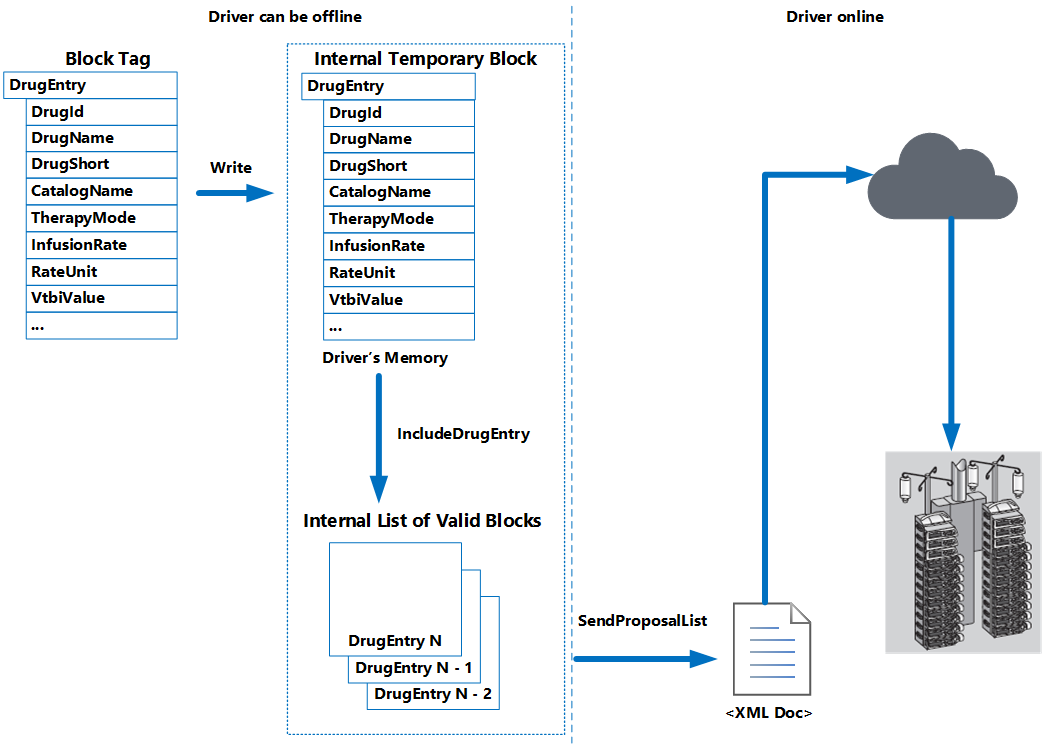
Operation of B. Braun AutoProgramming Driver