1.In the WaterSupply object of the System1 Water Distribution Network, add a SCADA-type Measurement Source for the Level Discrete Measurement and link that Measurement Source with the respective I/O Tag, according to the next figure.
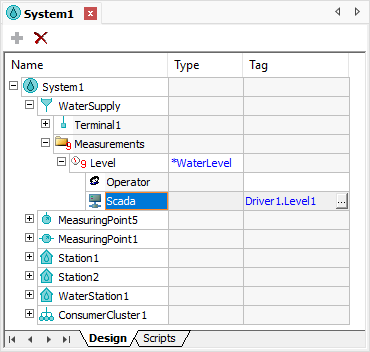
SCADA-type Source for the Level Measurement
2.In the Pump1 object from Plant1 Station of System1 Water Distribution Network, add SCADA-type Measurement Sources for the UpstreamPressure (on Terminal1), DownstreamPressure (on Terminal2), Current, Flow, and PumpSpeed Discrete Measurements. Also add a SCADA-type Measurement Source for the PumpStatus Analog Measurement (on folder Measurements). Link all those Measurement Sources with their respective I/O Tags, according to the next figure.
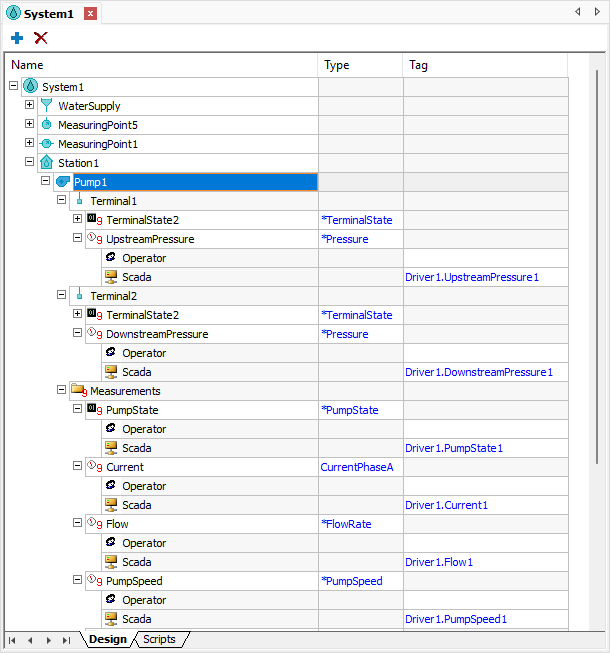
SCADA-type Sources for the Pump1 object
3.In the Valve1 object from Plant1 Station of System1 Water Distribution Network, add SCADA-type Measurement Sources for the ValveStatus Analog Measurement and for the ValvePosition Discrete Measurement, linking those Measurement Sources with their respective I/O Tags, according to the next figure.
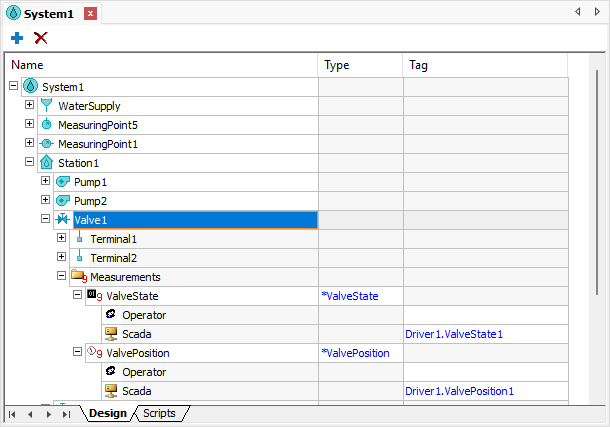
SCADA-type Sources for the Valve1 object
4.Configure the ActiveSource property of all Measurements, Discrete and Analog, described previously to the value 1: wstScada, according to the next figure.
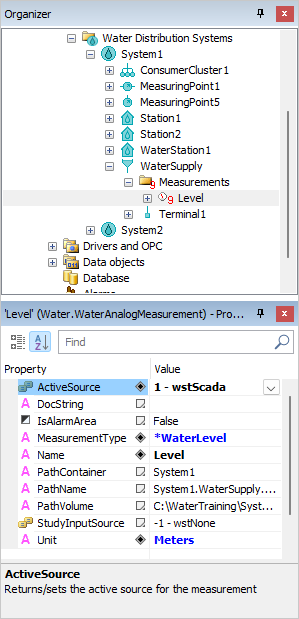
ActiveSource property of Measurements
5.Execute the application and test this new functionality.