When inserting Measurements, users must always consider the location where that Measurement is requested. Inside a Measurement, whether Analog or Discrete, users can insert one or more Measurement Sources, indicating how information is received by an application. These Measurement Sources can be input ones or from a Hydraulic Study. To insert a Measurement Source, right-click a Measurement, select the Add option and then the type of Measurement Source, according to the next image.
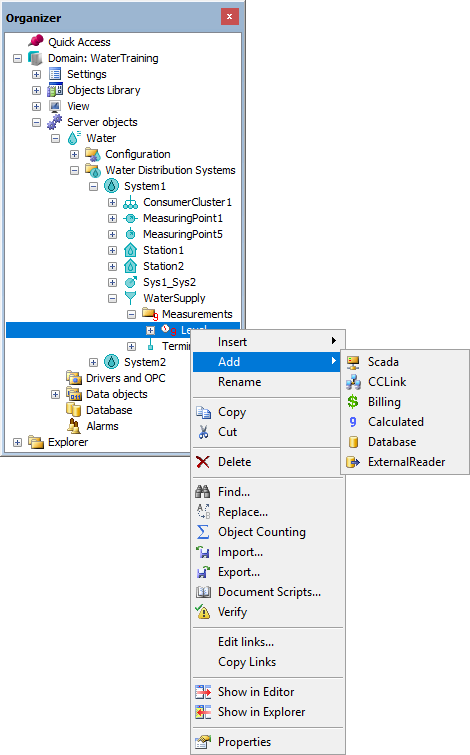
Option to add a Measurement Source
The available types of Measurement Sources are described on the next table.
Types of Measurement Sources
Measurement Source |
Description |
|---|---|
Operator |
This value is informed manually by the operator of the hydraulic system |
Scada |
This value is received by an I/O variable |
CCLink |
This value is received by another Control Center |
Billing |
This value is received by the billing system |
Calculated |
This value is calculated |
Database |
This value is received using a table field from a database. NOTE: The application is responsible for configuring a Query and the methods to retrieve this data from a database |
TopologyProcessor |
This value comes from a Topology Processor-type Hydraulic Study |
ExternalReader |
This value comes from an External Reader-type Hydraulic Study |
By default, each Measurement is created containing an Operator-type Measurement Source. For input Measurement Sources, except for the Operator-type Source, users must configure which variable provides their values. This configuration is performed in the Tag property of an Analog or Discrete Measurement.