In this exercise, let's add Analog Measurements of current, flow, and speed for Pumps of the Water Distribution Network's Station.
1.Create the Analog Measurement "CurrentPhaseA", according to the next figure.
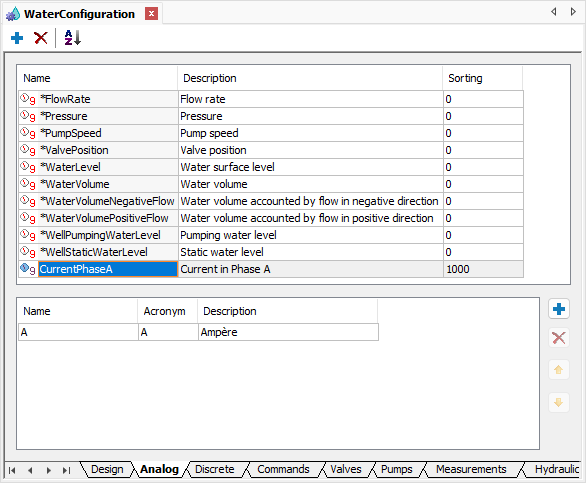
Analog Measurement CurrentPhaseA
2.Add the Analog Measurements "Current", "Flow", and "PumpSpeed" on folder Measurements of the Pump1 object of the Station1 Station of the System1 Water Distribution Network.
3.Select the value CurrentPhaseA in the MeasurementType property of the Current Analog Measurement and configure the Unit property of this Measurement with the value "A".
4.Select the value *FlowRate in the MeasurementType property of the Flow Analog Measurement and configure the Unit property of this Measurement with the value "LPS".
5.Select the value *PumpSpeed in the MeasurementType property of the PumpSpeed Analog Measurement and configure the Unit property of this Measurement with the value "LPM".
6.Add the Analog Measurement "UpstreamPressure" in Terminal1 and the Analog Measurement "DownstreamPressure" in Terminal2 of the Pump1 object of the Station1 Station of Water Distribution Network System1.
7.Select the value *Pressure in the MeasurementType property of Analog Measurements UpstreamPressure and DownstreamPressure and configure the Unit property of these Measurements with the value "mH2O".
8.Add the Analog Measurement "Level" on folder Measurements of the WaterSupply object of the System1 Water Distribution Network.
9.Select the value *WaterLevel in the MeasurementType property of the Level Analog Measurement and configure the Unit property of this Measurement with the value "Meters".
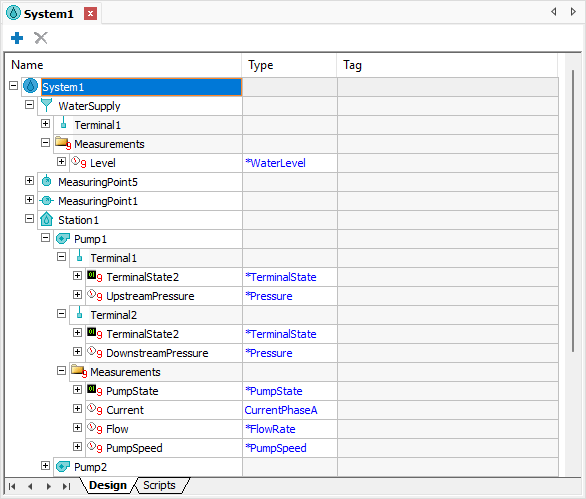
Result of configuring Analog Measurements