1.Right-click the TurnOff Command Unit of the PumpStateCommand Discrete Command of the Pump1 object of the Station1 Station of System1 Water Distribution Network and select the Add - Interlocks option.
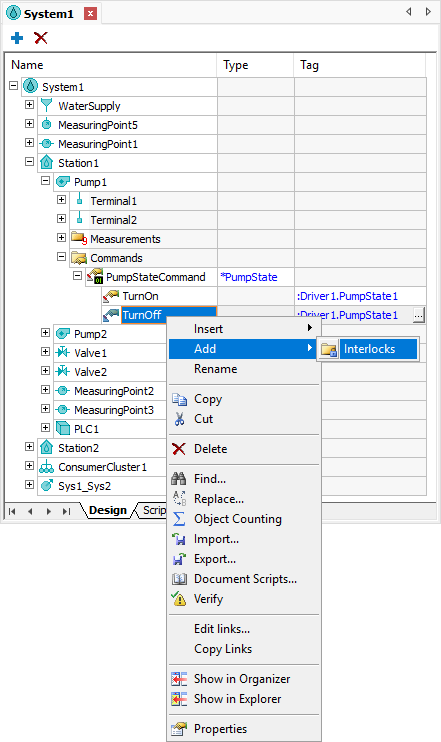
Add - Interlocks option
2.Right-click the Interlocks folder and select the Insert - Interlock option.
3.Configure the properties ComparisonOperator, ComparisonValue, and Measurement of this Interlock according to the next figure.
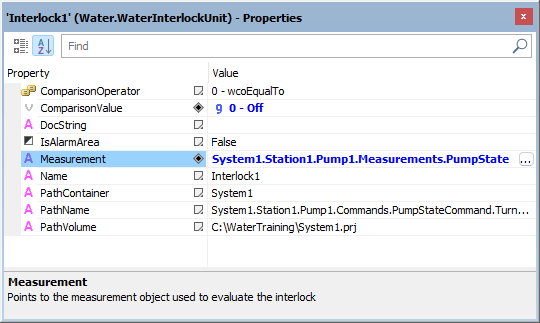
Interlock properties
4.Copy the Interlocks folder of the TurnOff Command Unit and paste it on the TurnOn Command Unit.
5.Configure the ComparisonValue property of the Interlock of the TurnOn Command Unit to the value 1: On.
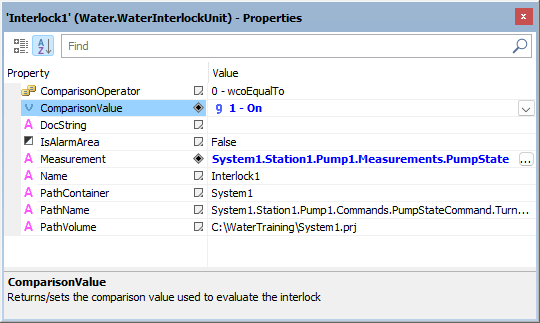
ComparisonValue property
6.Execute the application and test this new functionality.