1.Add a Setpoint Command on the Commands tab of the Water Configuration object and configure it according to the next figure.
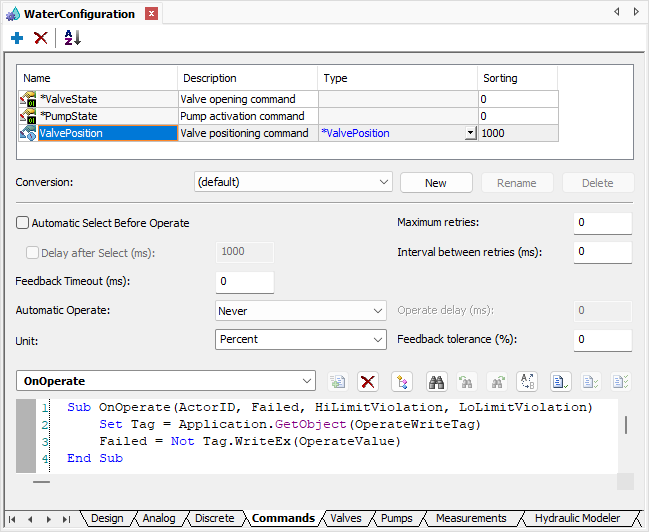
Setpoint Command
2.Add a Setpoint Command on the Commands folder of the Valve1 object of the Station1 Station of the System1 Water Distribution Network.
3.Change the name of this Setpoint Command to "ValvePositionCommand" and select the value ValvePosition in the CommandType property.
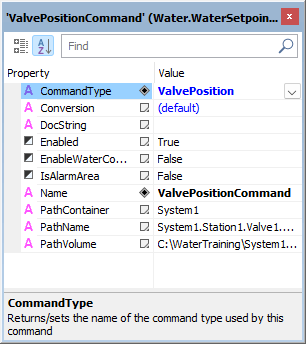
CommandType property
4.In the existing Command Unit of this Setpoint Command, select the ValvePosition1 I/O Tag of Driver1 on the Tag column of the Design tab, according to the next figure.
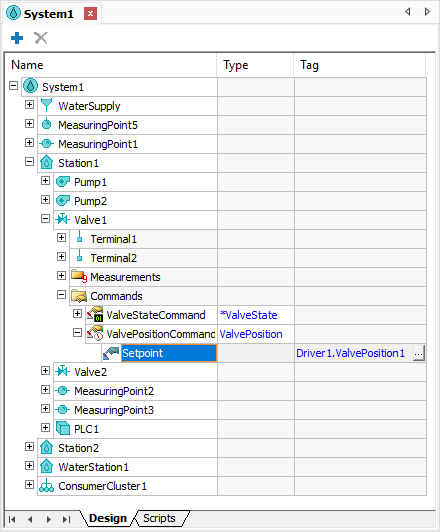
Tag column of the Command Unit