Opens a specific Screen or Frame.
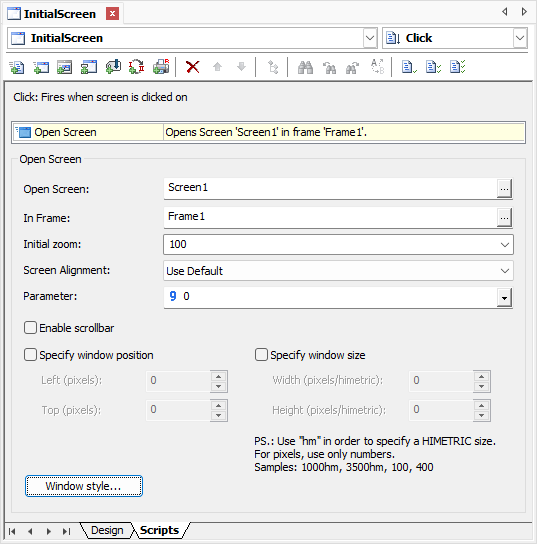
Settings for the Open Screen Pick
The available options for the Open Screen Pick are described on the next table.
Available options for the Open Screen Pick
Option |
Description |
|---|---|
Open Screen |
Selects a Screen to open |
In Frame |
Selects a Frame in which a Screen is viewed. If it is blank, this is the main Frame (_top) |
Initial zoom |
Defines the zoom of a Screen, when displayed |
Screen Alignment |
Defines the alignment of a Screen relative to the visible area. Possible values are Use Default, Force Top Left, or Force Center |
Parameter |
Indicates a parameter to pass when calling a Screen |
Enable scrollbar |
Allows using scroll bars on a Screen |
Specify window position |
Indicates the position of a window, in pixels, relative to top and left |
Specify window size |
Indicates the width and height of a window, in pixels or Himetric units |
Window size is internal |
Indicates whether the values of the Width and Height options correspond to the internal size of a window, deducting border and title bar, or correspond to the total size of a window, considering border and title bar |
Window style |
Opens the Window Style dialog box |