The [P] parameters to configure this Driver are not used. All settings are performed on the configuration window of this Driver. For more information about the Setup, Serial, Ethernet, Modem, and RAS tabs, please check topic Documentation of I/O Interfaces. The UniTelway tab, shown on the next figure, contains specific settings for this Driver.
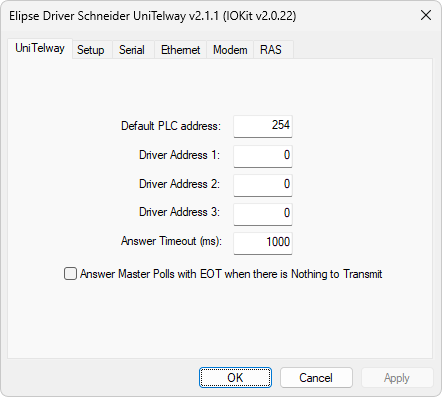
UniTelway tab
The available options on this tab are are described on the next table.
Available options on the UniTelway tab
Option |
Description |
|---|---|
Default PLC Address |
Default address of a device |
Driver Address 1 |
Address 1 (one) for use by this Driver |
Driver Address 2 |
Address 2 (two) for use by this Driver |
Driver Address 3 |
Address 3 (three) for use by this Driver |
Answer Timeout (ms) |
Indicates the maximum time-out that this Driver waits for the conclusion of a reading |
Answer Master Polls with EOT when there is Nothing to Transmit |
Indicates that this Driver must send an EOT (End of Transmission) byte to a Master device whenever requested and there is no message to transmit. This procedure accelerates the polling process performed by this device |
NOTE |
The value of the Driver Address options from 1 (one) to 3 (three) can be repeated if there is no possibility of 3 (three) distinct addresses. |