P1 |
Not used |
P2 |
Not used |
P3 |
Not used |
P4 |
Not used |
This Driver does not use the [P] configuration parameters. All configurations must be performed on the configuration window, shown on the next figure.
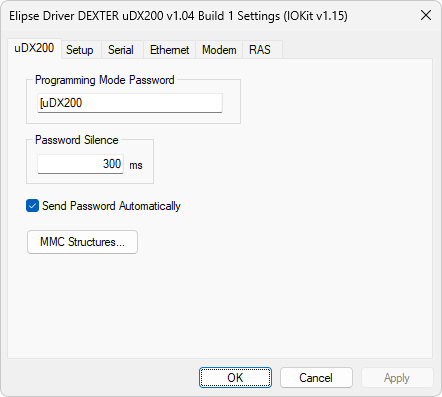
uDX200 tab
The configuration options on this window are described on the next table.
Available options on the uDX200 tab
Option |
Description |
|---|---|
Password sent by this Driver to unlock remote communication. The default value of this option is "[uDX200" |
|
Password Silence |
Silence period observed by this Driver after sending a programming mode password. The default value of this option is 300 ms |
Send Password Automatically |
If this option is enabled, this Driver automatically manages sending a password. This password is alwyas sent right after connection, and whenever this Driver remains more than 1 (one) minute without communicating |
Opens a window to configure structures, shown on the next figure, to read an MMC card |
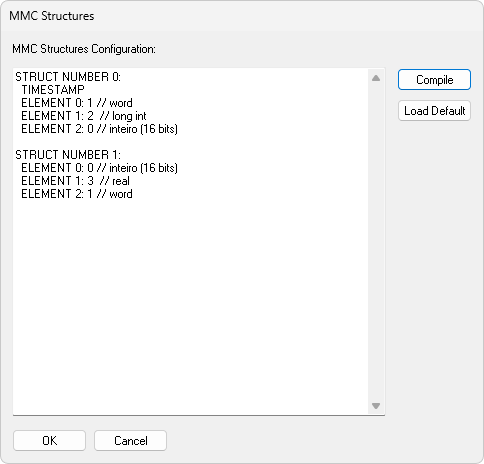
Window to configure MMC structures
The structures configured on this window must have the format shown next.
STRUCTURE NUMBER <Structure Number>:
TIMESTAMP
ELEMENT <Element Index>: <Element Type>
ELEMENT <Element Index>: <Element Type>
ELEMENT <Element Index>: <Element Type>
In which:
•<Structure Number>: Number identifying a block or structure format, provided in the B3 parameter
•TIMESTAMP: Optional field indicating that the first 3 (three) fields returned in each record are the timestamp of an event
•<Element Index>: Index of a block element that returns the specified value, starting at 0 (zero)
•<Element Type>: Data type of an element, defined as a number of keyword, with the following values:
•0: A 16-bit integer between -32768 and 32767
•1: A 16-bit Word between 0 (zero) and 65535
•2: A 32-bit long integer between -2147483648 and 2147483648
•3: A 32-bit real number between -2.93873587705572E-39 and 3.40282346638529E+0038
•String: Returns a String exactly as read from a device
The available options on the window to configure MMC structures are described on the next table.
Available option on the window to configure MMC structures
Option |
Description |
|---|---|
Compile |
Compile the configuration file of structures to check for errors. This file is also compiled when clicking OK |
Load Default |
Loads a default configuration file, which is used the first time this Driver is loaded in an application |