The requirement for a successful communication of a PLC with a supervisory application executing in an Elipse Software application is the presence of a Ladder program executing with its variables correctly configured in this Driver. This PLC must also have a known AMS Net Id and an available communication port, correctly configured in this Driver.
On the computer executing the supervisory application, on the other hand, users must configure the ADS routing by using a Beckhoff software.
When using PLC CX1000 Embedded PC, all remote connections can be configured using AMS Remote Connections. This software is on the installation directory of TwinCAT System Manager, on sub-folder ADS Api/TcAdsDll. This software presents the local AMS Net Id and a list of remote devices. Remote connections must be added by clicking Add, which opens a dialog box with the next options:
•Name: Name of a connection
•AMS Net Id: Net Id of a remote computer
•Address: IP address or host name
•Transport: Transport protocol, which is always "TCP/IP"
This software must be executed in CX1000 PLC, but this time configuring the computer executing the supervisory application as the remote computer.
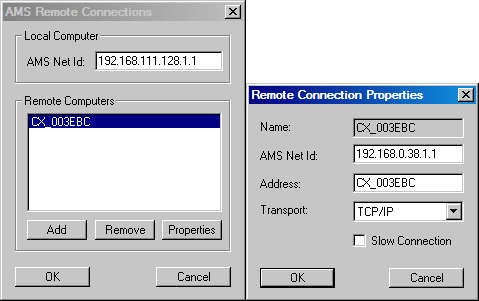
Configuration of AMS Remote Connections application
In other devices, the routing task can be easily performed by using TwinCAT System Manager. In it, users can identify all ADS devices by scanning the whole network and, after creating a list of devices, selecting the items to add a routing. In this case, the routing is performed bidirectionally, that is, Computer » Device and Device » Computer, and not only on a single direction, as with AMS Remote Connections.
After finishing all ADS routing configurations, restart all configured devices. For more information about these applications and Beckhoff's TwinCAT PLCs, please check their documentation.