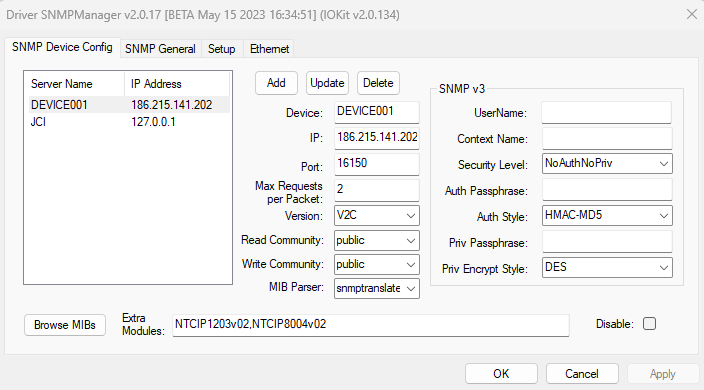
Select the SNMP Device Config tab to configure Agents or devices, according to the next figure.
SNMP Device Config tab
The available options on this tab are described on the next table.
Available options on the SNMP Device Config tab
Option |
Description |
|---|---|
Add |
Adds a device or Agent |
Update |
Updates the configuration of the selected device or Agent. Changes performed without confirmation using this option are discarded |
Delete |
Removes the selected device or Agent |
Device |
Symbolic name of a device or Agent. This name is used only to identify a device for this Driver, mapping it to the IP address and UDP/IP port configured in the IP and Port options, respectively, in addition to other settings |
IP |
Informs the IP address of an Agent |
Port |
Informs the UDP/IP port in which an Agent expects for a connection. The default UDP/IP port is 161, but some devices or simulators can use other UDP/IP ports |
Max Requests per Packet |
Maximum number of requests for variables, or OIDs, to perform in a single message for an Agent. The more requests can be performed at each communication, the quicker and more efficient is the general scan of variables configured for a device. NOTE: Variables not declared for exclusive reception of Traps use a polling method, always respecting the maximum number of variables for each request. Please check topic Tag Reference for more information |
Version |
Version of the SNMP protocol used by an Agent. Currently this Driver supports versions V1, V2C and V3 |
Text used as a parameter on SNMP messages to indicate the group or community of variables to which this request belongs. The most common community is public, but there can also be variables from a private community or other communities created by other companies or users. In this case, type the name of a community. In case of using more than one community, their names must be separated by semicolons, such as "public;communityA;communityB". The community used for each Tag, which can only be one, is defined by the N2 parameter, in which the value 0 (zero) is the first community on that list, the value 1 (one) is the second community on that list, and so on |
|
Inform the default community used for writing. Only one community value is accepted for writing |
|
Up to version 2.0.21, this Driver used only the smidump interpreter for files in MIB format, generating a view of Tags that can be imported to an application using Tag Browser. Starting with version 2.0.22, users can also use the snmptranslate interpreter, which can generate different results depending on the file in MIB format |
|
Browse MIBs |
Opens a dialog box to select files in MIB format to import, which provide patterns for Tags |
Extra Modules |
List of modules imported using the Browse MIBs option |
Disable |
Disables this device, not establishing communication with this Driver when it starts, and also hides an Agent from the list of devices on the Tag Browser window |
SNMP v3 - UserName |
Name of a user to use when the selected version is V3. It must be compatible with the name of a user defined in an Agent |
SNMP v3 - Context Name |
Name of a context to use when the selected version is V3. It must be compatible with the name of a context defined in an Agent |
SNMP v3 - Security Level |
Defines options for authentication and privacy. The authentication option uses a hash mechanism to check whether a message was changed in the transmission process. The privacy option means that, in addition to authentication, data is encrypted and therefore invisible to an external observer. Privacy is only available with authentication, therefore the available options are NoAuthNoPriv: There is no security functionality and the protocol behaves as in version V2C, AuthNoPriv: Uses authentication without privacy, or AuthPriv: Uses authentication and privacy |
SNMP v3 - Auth Passphrase |
Informs a password used for authentication. This password must match the password defined in an Agent |
SNMP v3 - Auth Style |
Algorithm for authentication. This algorithm is also used to transform authentication and privacy passwords into a private key, thus not exposing this password in plain text. The available options are HMAC-MD5, HMAC-SHA1-96, or HMAC-SHA2-256 |
SNMP v3 - Priv Passphrase |
Informs a password used for privacy. The password must match the password defined in an Agent |
SNMP v3 - Priv Style |
Algorithm for privacy. The available options are DES, 3DES, AES128, AES196, or AES256 |
Important Information about Authentication and Cryptography Algorithms in SNMP Protocol V3
The current official specification of the SNMP protocol only defines the MD5 and SHA1-96 algorithms for authentication and DES and AES128 algorithms for cryptography. However, over time new algorithms have been developed and use longer keys to prevent breaching communication, such as using a brute force method, and many manufacturers adopt these new algorithms on their own.
In case of selecting an authentication option that generates a key shorter than the minimum needed for a cryptography algorithm, this Drivers uses a method for extending a key, described on document Extension to the User-Based Security Model (USM) to Support Triple-DES EDE in "Outside" CBC Mode and used by Cisco and other manufacturers. Notice that this mechanism is not used when authentication is equal to SHA2-256, because this authentication already produces a key with the right size. The next tables contain the default sizes of keys for each cryptography algorithm.
Sizes for authentication keys
Authentication |
Size |
|---|---|
MD5 |
16 bytes |
SHA1-96 |
20 bytes |
SHA2-256 |
32 bytes |
Sizes for cryptography keys
Crypthography |
Size |
|---|---|
DES |
Needs a key with 16 bytes |
3DES |
Needs a key with 32 bytes |
AES128, AES192 e AES256 |
Needs keys with 16, 24, and 32 bytes, respectively |
Therefore, when selecting the MD5 authentication option and the 3DES cryptography option, the algorithm automatically extends the key from 16 to 32 bytes.
MIB Files
The Tags of an Agent can be created by importing files in MIB (Management Information Base) format, retrieved from public domain and standardized according to IETF, IRTF, and IANA standards, among others, or provided by Agent's or device's manufacturers.
Click Browse MIBs to open a dialog box to select files in MIB format for importing. After selecting the files, an entry is created in the declaration section of devices corresponding to an Agent, in addition to a folder on the Tag Browser window containing all Tags identified.
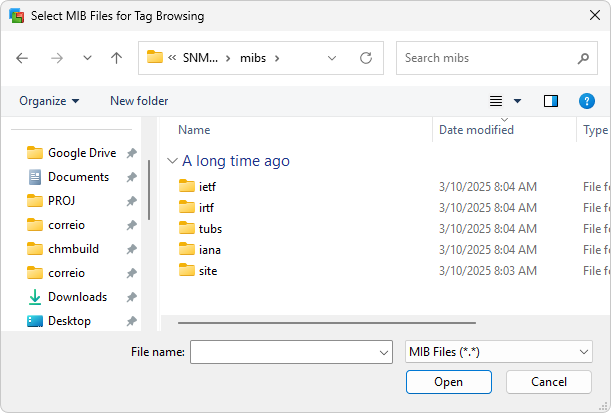
Together with this Driver, there is a mibs folder with a very complete and updated set of files in standard MIB format, as shown on the next figure.
Window to select MIB files
If users want to import files in MIB format provided by manufacturers of devices or third-party manufacturers, these files must be copied to the mibs/site folder.
For this import process to succeed, each file in MIB format must have the exact same name of the module contained in this file, that is, the name found before the keyword DEFINITIONS at the beginning of this file, without extension or additional characters.
After selecting the files in MIB format, the import process is executed and, if successful, the Extra Modules list of the selected device is filled with the new modules, as a list separated by semicolons. This operation is equivalent of manually editing this list and clicking Update.
These modules are available on the Tag Browser window of Elipse E3, Elipse Power, or Elipse Water as folders containing all imported objects and maintaining the hierarchy of modules, nodes, tables, rows. columns, groups, notifications, and scalars from each file in MIB format in each device.
NOTE |
To add the same file in MIB format to several devices, add this file in the Extra Modules option for each one of these Agents. |
The import process provides the Tags with the parameters described on the next table.
Tag parameters from the import process
Parameter |
Description |
|---|---|
Name |
Default symbolic name of a scalar or column of a table, as retrieved from a file in MIB format |
ParamDevice |
Name of a user-defined Agent on the list of devices or Agents |
ParamItem |
Default number of an OID (Object Identifier) address already in ASN.1 (Abstract Syntax Notation) format, used by the SNMP protocol and retrieved from a file in MIB format |
When a Tag references a scalar object, that is, a simple instance, the OID address ends with ".0". When a Tag represents a column of a table, this Tag is created with a default index 1 (one), indicated by brackets, that is, [1].
Tables in the SNMP protocol may contain n rows. Tags, which are the columns, are therefore created with the address of row 1 (one) by default. In case of Tags for other rows, change the index or create copies of a Tag pointing to other indexes, according to the next examples.
'Default Tag for a column called lldpPortNum:
lldpPortNum.1 = 1.0.8802.1.1.2.1.3.7.1.1[1]
'For Tags to other rows, copies can be created:
lldpPortNum.0 = 1.0.8802.1.1.2.1.3.7.1.1[0]
lldpPortNum.2 = 1.0.8802.1.1.2.1.3.7.1.1[2]
lldpPortNum.3 = 1.0.8802.1.1.2.1.3.7.1.1[3]
If a table does not contain a certain cell, the quality of this Tag is configured as Bad.