Select the SNMPAgent tab on Driver's configuration window, according to the next figure.
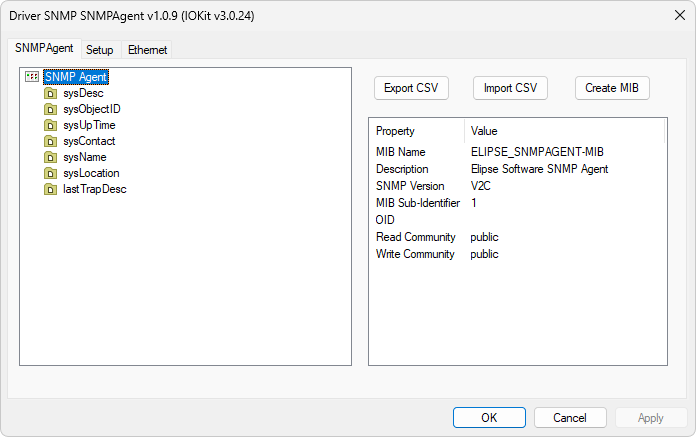
SNMPAgent tab
On this tab, users can define a configuration for SNMP Agent Driver and its variables or Address Spaces. The tree on the left allows defining or selecting Address Space items and the list on the left allows configuring the selected item.
SNMP Agent
SNMP Agent properties
Property |
Description |
|---|---|
MIB Name |
Defines a name for a MIB (Management Information Base) used on the file to generate, for importing by an SNMP Manager |
Description |
Description of a MIB |
SNMP Version |
Defines the version of the protocol used when sending SNMP Traps. This Driver responds to Get, Set, and GetNext requests in versions V1 and V2C |
MIB Sub Identifier |
Composes this Agent's initial address, after an initial fixed OID (Object Identifier) "1.3.6.1.4.1.4380.12". The meaning of these values is 1: ISO Assigned OIDs, 3: ISO Identified Organization, 6: US Department of Defense, 1: OID Assignments for Internet, 4: Internet Private, 4380: Elipse Software, and 12: Starting Address |
Read Community |
A text identifying the community parameter in SNMP Get requests. The default value of this property is "public" |
Write Community |
A text identifying the community parameter in SNMP Set requests. The default value of this property is "public" |
Default SNMPAgent Items
Items on the next table cannot be removed or edited.
Non-editable items
Item |
Description |
|---|---|
sysDesc |
Textual description of an Agent |
sysObjectID |
Full identifier of an Agent (OID, Object Identifier) |
sysUpTime |
Time, in hundredths of a second, since this Driver was started for the last time |
sysContact |
Identification and contact information of the user responsible for system maintenance |
sysName |
A name for this Agent |
sysLocation |
Physical location of this Agent |
lastTrapDescription |
Description of the last Trap sent by this Agent |
SNMP Groups
Every information to transfer or to receive from an SNMP Manager must be defined inside SNMP groups. To add a group, right-click the SNMPAgent item and select the Add Group option. Each group has the properties described on the next table.
Properties of an SNMP group
Property |
Description |
|---|---|
Name |
Name of a group |
Description |
Description of a group |
OID |
Object Identifier (OID) considering the OID of an upper level and a sub-identifier of this group |
MIB Sub Identifier |
Composes the OID of this item and its children |
SNMP Group Items
Every information to transfer or to receive from an SNMP Manager must be declared as items inside an SNMP group. To add an item, right-click a group and select the Add Item option. Each item has the properties described on the next table.
Properties of an SNMP group item
Property |
Description |
|---|---|
Name |
Name of an item |
Description |
Description of an item |
OID |
Object Identifier (OID) considering the OID of an upper level and a sub-identifier of this item |
MIB Sub Identifier |
Composes the OID of this item |
SNMP DataType |
Possible values are Integer32, Unsigned32, Gauge32, Counter32, Counter64, TimeTicks, OctetString, Opaque, IPAddress, or ObjectIdentifier |
Access Type |
Read-Only or Read-Write |
SNMP TrapGroups
Every information to transfer as SNMP Traps must be defined inside a TrapGroup. To add a TrapGroup, right-click the SNMPAgent item and select the Add TrapGroup option. Each TrapGroup has the properties described on the next table.
Properties of a TrapGroup
Property |
Description |
|---|---|
Name |
Name of a TrapGroup |
Description |
Description of a TrapGroup |
OID |
Object Identifier (OID) considering the OID of an upper level and a sub-identifier of this group |
MIB Sub Identifier |
Composes the OID of this item and its children |
Trap Destination |
Destination's IP address or DNS name |
Trap Port |
Destination's UDP port. The default value of this property is 162 |
Send All Members together |
If this property is configured as True, only when a child item with its TrapTrigger property equal to True changes, the SNMP Trap is sent with the current value of all children of that group, including the Trigger's Tag. If this property is configured as False, each child item triggers an independent Trap when it changes |
Force RFC 3418 Trap |
Indicates that the Trap must include the SysUpTime members and the SNMP TrapOID in the message, thus becoming compatible with RFC 3418 |
SNMP TrapGroupItems
Every information to transfer as an SNMP Trap must be declared as an item inside a TrapGroup. To add a TrapGroupItem, right-click a group and select the Add Item option. Each item has the properties described on the next table.
Properties of a TrapGroupItem
Property |
Description |
|---|---|
Name |
Name of an item |
Description |
Description of an item |
OID |
Object Identifier (OID) considering the OID of an upper level and the sub-identifier of this item |
MIB Sub Identifier |
Composes the OID of this item |
SNMP DataType |
Possible values are Integer32, Unsigned32, Gauge32, Counter32, Counter64, TimeTicks, OctetString, Opaque, IPAddress, or ObjectIdentifier |
Trap Trigger |
Informs if a change in this item triggers the TrapGroup, sending the value of all members in a single Trap message |
Force Specific OID |
A Boolean indicating that the automatic OID, based on trap group OID, must be replaced by the OID informed in the User Specific OID property |
User Specific OID |
OID to replace the default OID |
Create MIB
Click Create MIB to save the current Address Space, including groups and TrapGroups, to the selected directory. This MIB file can be imported by an SNMP Manager, such as Elipse Software's SNMP Manager Driver.
For more information about the Setup, Serial, Ethernet, Modem, and RAS tabs, please check topic Documentation of I/O Interfaces.