The available options on this tab must be configured according to data sent by the Callback.
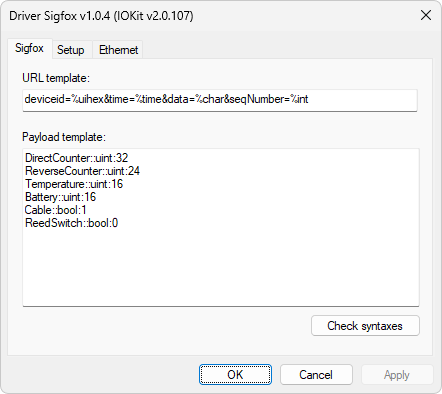
Sigfox tab
URL template
This option must contain, on a single line, the format of the variables sent in the Callback in the URL field. Each variable must be in the same order sent by the Callback. Each variable must be separated from each other by the character & (ampersand) and after each character = (equal sign) users must add a format, according to the next example.
Variable1=%uint&Variable2=%time&Variable3=%char&[...]VariableN=%int
The available formats for URL template variables are the following:
•%bool: The received value is interpreted as True (different from zero) or False (equal to zero)
•%char: The received value is interpreted as ASCII characters and displayed as a String
•%float: A floating point number
•%uint: An unsigned integer number
•%uihex: An unsigned integer number from a value represented in a hexadecimal base
•%int: A signed integer number
•%time: A value in UNIX time format, that is, the number of seconds since 01/01/1970 00:00:00. Only one variable with a %time type is allowed in a URL template and this value is set to the timestamp of the reading Tag
Payload template
This option allows multiple lines, and each line must contain the declaration of only one variable. This value is optional. If there is no data=%char variable in the URL template, then this template must not be filled. If there is a data=%char variable in the URL template and the payload template is not configured, the value in this variable is displayed as a %char type. The format to declare variables in a payload template complies with the format described next.
•For number variables (UInt, Int, and Float):
<Variable name>::<Format>:<Bits number>[::<Initial bit offset>]
•<Variable name>: Any name for this variable
•<Formatter>: This can be Int, UInt or Float
•<Bits number>: Length of a number variable in bits, ranging from 1 (one) to 64 bits for Int and UInt types and 32 or 64 for Float types
•<Initial bit offset>: Initial position in the current byte. Values between 0 (zero) and 7 (seven) are allowed. This parameter is optional
•For Bool-type variables:
<Variable name>::Bool[:<Bit offset>]
•<Variable name>: Any name for this variable
•<Bit offset>: Bit position in the current byte. Values between 0 (zero) and 7 (seven) are allowed. This parameter is optional
Each Bool variable occupies one bit and, in case of continuous Bool-type variables, these ones occupy a bit each in the current byte and they must be declared in descending order of a bit position, that is, from 7 (seven) to 0 (zero)
•For Char-type variables:
<Variable name>::Char:<Character length>[:<Initial bit offset>]
•<Variable name>: Any name for this variable
•<Character length>: Length of a Char-type variable as a number of octets. Values from 1 (one) to 24 are allowed
•<Initial bit offset>: Initial position in the current byte. Values between 0 (zero) and 7 (seven) are allowed. This parameter is optional
The Check syntaxes option checks if all settings were properly configured, according to the syntax of each field.
Example of declaring a URL template
deviceid=%uihex&time=%time&data=%char&seqNumber=%int
•deviceid: Interpreted as a hexadecimal integer number
•time: Interpreted as a time and attributed to the reading Tag's timestamp
•data: Payload variable that can be interpreted according to the Payload template
•seqNumber: Interpreted as an integer number
Example of declaring a Payload template
DirectCounter::uint:32
ReverseCounter::uint:24
Temperature::uint:16
Battery::uint:16
Cable::bool:1
ReedSwitch::bool:0
•DirectCounter: A 32-bit unsigned integer number
•ReverseCounter: A 24-bit unsigned integer number
•Temperature: A 16-bit unsigned integer number
•Battery: A 16-bit unsigned integer number
•Cable: Bit from position 1 (one)
•ReedSwitch: Bit from position 0 (zero)