Configuration parameters are defined on the configuration window of this Driver, on the Alstom S8000E tab, according to the next figure.
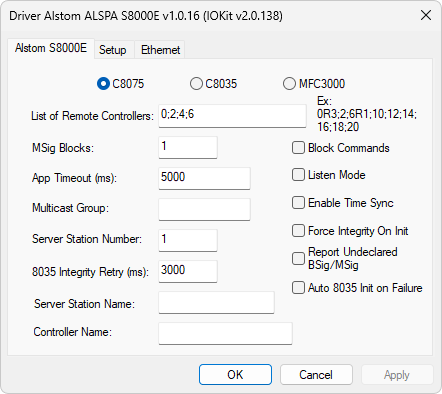
Alstom S8000E tab
The available options on this tab are described on the next table.
Available options on the Alstom S8000E tab
Option |
Description |
|---|---|
C8075, C8035, or MFC3000 |
Defines the model for the Head of Cell Controller |
Declares a list of cell's Controllers, including the Head of Cell, with number 0 (zero), and all other remote racks separated by semicolons. Each address can be declared with a special character, as detailed next |
|
MSig Blocks |
Number of blocks of MSig Tags, 64 MSig Tags each, only used for model 8075 |
App Timeout (ms) |
Default time for a command response, in milliseconds |
Multicast Group |
This is usually the UDP/IP address 224.0.9.5 |
Server Station Number |
Default CIS address. Leave this option in 0 (zero) |
8035 Integrity Retry (ms) |
Default time interval, in milliseconds, for a new integrity request for Controller 8035, in case of not receiving one. Default value of this option is 3000 |
Server Station Name |
Name of a station, or Elipse E3, Elipse Power, or Elipse Water server, in the communication with a Controller model MFC 3000 |
Controller Name |
Name of a Controller model MFC 3000 |
Block Commands |
Blocks sending commands from this Driver |
Listen Mode |
Blocks sending any message, only processing messages received from Controllers |
Enable Time Sync |
Enables sending clock syncing messages to the multicast addresses 224.0.9.1 and 224.0.9.5, or to the address configured in the Multicast Group option |
Force Integrity on Init |
Enables a request for a digital integrity, BSig and MSig, when initializing this Driver. The S8000E protocol uses the concept of integrity and changes for digital and discrete signals, BSig and MSig |
Report Undeclared BSig/MSig |
Indicates if, when receiving an integrity or change, this Driver must report the value to the point, even though the Tag is not declared by the application. In this case, the value remains in an Elipse E3, Elipse Power, or Elipse Water memory cache and, as soon as a corresponding Tag is created, the value is then sent to this Tag |
Auto 8035 Init on Failure |
In case of a full restart of Controller 8035, this Controller must receive an initialization by this Driver. This procedure can be automatic or performed by writing to a Tag. Select this option for this procedure to be automatic. This initialization consists of sending a configuration file to a device |
The addresses declared in the List of Remote Controllers option can be declared with an optional character, in the following way:
•R1: Redundant Configuration 1 (N 00 N 01)
•R2: Redundant Configuration 2 (N 00 N 02)
•R3: Redundant Configuration 3 (N 00 N 01 N 02 N 03)
•R4: Redundant Configuration 4 (N 00 N 01 N 03 N 03 N 04)
•R5: Redundant Configuration 5 (N 00 N 01 N 02)
•R6: Redundant Configuration 6 (N 00 N 01 N 03 N 03 N 04 N 05)
•R8: Redundant Configuration 8 (N 00 N 01 N 03 N 03 N 04 N 05 N 06 N 07 N 08)
•No additional character: No redundancy information (N 00)
An example of configuration is displayed on the Alstom S8000E tab. This configuration is used to request a data integrity when initializing this Driver, and it must be compatible with a system's real configuration.
These files are generated on ControCAD's FTP server, on folder C:\Inetpub\ftproot\Echange\res\ProjectName\reference\Res5, in the format SRVNNN.CNF, where NNN is the index of the Controller's CPU, such as SRV001.CNF.
These files must be renamed with the IP address of each CPU, using an underscore (_) character to replace the dot character, such as "195_3_0_1.CNF". These files must be placed on the same directory of this Driver's library file. To send this configuration using a Tag, create a Tag with its Item parameter equal to "Init8035,U8,0" and perform a writing operation, by sending any value.
Ethernet Tab
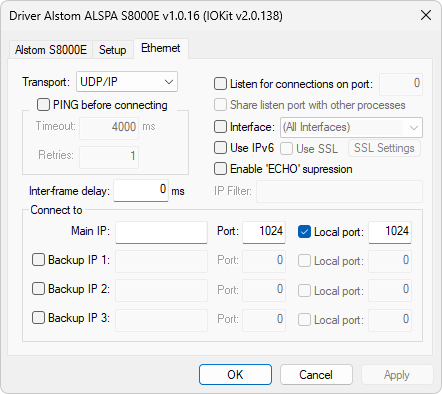
Ethernet tab
On the Ethernet tab, select in the Interface option the network interface in the same range of IP addresses of Controllers. This Driver always starts internally forcing the Transport, Listen for connections on port, and Share listen port with other processes options. The listening port must be correctly configured.
Models C8035 and C8075
On the Connect to group, inform the main and backup IP addresses, if available, of the Head of Cell remote station, as well as the origin and destination UDP/IP ports with the value 1024. The listening port must also be equal to 1024.
This Driver processes all multicast messages whose byte with address S8000 available in the message corresponds to the end of the main or backup IP address. According to the configuration of the S8000 network, the IP address of the backup CPU must have an IP address identical to the main IP address, except by the last octet, to which users must add the value 64. For example, if the main IP address is 195.5.0.38, the backup IP address must be 195.5.0.102 (38 + 64). Therefore, all messages are processed for the IP addresses whose last octets are 38 and 102, handled as redundants.
Model MFC3000
On the Connect to group, inform the main and backup IP addresses, if available, of the Head of Cell remote station, as well as the destination UDP/IP port with the value 2002 and the origin port with value 2001. The listening port must also be equal to 2001.
This Driver processes all multicast messages whose byte with address S8000 available in the message corresponds to the end of the main or backup IP address.
Other Important Information
•Time Multicast Address: 224.0.9.1 (Fixed)
•Commands for model MFC3000: Always sent through controller's UDP/IP port 2002
•Commands for models C8035 and C8075: Always sent through controller's UDP/IP port 1024