The [P] configuration parameters of this Driver are not used. All settings are performed on the properties window of this Driver. On this window, the most relevant parameters on the Setup tab are:
•Physical Layer: Always select the value None, because the interface is provided by the Prodave library
•Logging options - Log to File: Name of a log file generated for debugging communication problems
For more information about the Setup tab, please check topic Documentation of I/O Interfaces.
The Prodave tab contains specific configurations for this Driver. Almost all these configurations are only relevant when configuring Tags by [N/B] parameters. These configurations are relative to the list of connections to declare. Therefore, when configuring Tags by symbolic addressing, this list of connections can be left blank. The exception is the Use S5 addressing method option, which must be considered regardless of the selected method of addressing.
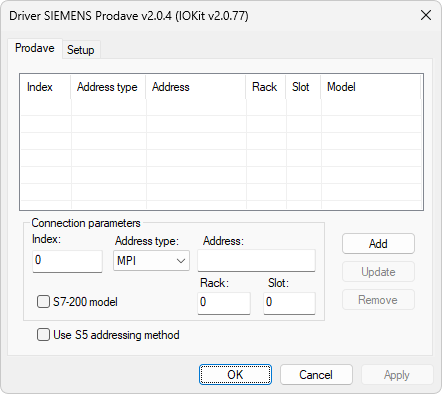
Prodave tab
All devices to communicate must be configured. To create a connection with a device, users must fill connection parameters and click Add. Connection parameters are described on the next table.
Configuration parameters of connections
Parameter |
Description |
|---|---|
Index |
Index of a connection for use in the N1 or B1 parameter |
Address type |
Type of address. Possible values are MPI, IP, or MAC |
Address |
Address of a device |
S7-200 model |
Select this option to indicate devices from S7-200 model |
Rack |
Value of the rack of a device |
Slot |
Value of the slot of a device |
The Update option reconfigures all parameters of the selected connection and the Remove option deletes the selected connection. The Use S5 addressing method option defines the addressing mode of data. If it is selected, addressing mode is S5 and it addresses words sequentially, such as DW0, DW1, DW2, DW3, and so on. If it is not selected, addressing mode is S7 and it addresses words by the address of the first byte, such as DW0, DW2, DW4, DW8, and so on.