This prototype does not use the [P] parameters for configuration. All configurations must be performed on this Driver's configuration window in Elipse E3, Elipse Power, or Elipse Water or on the extra parameters window in Elipse SCADA, according to the next figure.
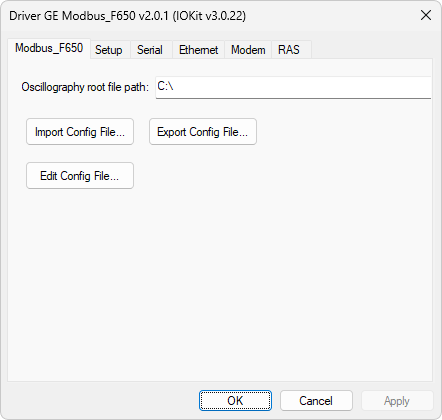
ModbusF650 tab
The available options on this tab are described on the next table.
Available options on the ModbusF650 tab
Option |
Description |
|---|---|
Oscillography root file path |
This option is not functional yet in this prototype. It was added to this window aiming to allow a user-defined directory to start collecting, in cases where the collected oscillography files must be stored on the user's computer. On this directory, each slave can have its own sub-directory, depending on the configuration file, as explained later. In this prototype, the root directory of collecting is always the computer's root directory, that is, C:\. Notice that a writing permission may be need for this directory on Windows Vista or later |
Import Config File |
Allows importing a configuration file from a text file on disk |
Export Config File |
Allows exporting a configuration file to a text file on disk |
Edit Config File |
Allows editing a configuration file loaded into this Driver. The format of this file is discussed next |
Configuration File
The configuration file of this Driver has the format shown next.
<Oscillography>
Slave: {Slave number}
Scan: {Scan time, in ms}
[Subfolder: {String defining a sub-directory on the root directory where files must be stored}]
...
Slave: N
Scan: {Scan time of slave N, in ms}
[Subfolder: {String defining a sub-directory on the root directory where files of slave N must be storedem ser armazenados}]
</Oscillography>
The format used in this prototype was created to be temporary, intended to benefit from tests. For a final version, a file in XML format can be convenient, due to an easy interpretation of this format.
Notice that the Subfolder field is shown between brackets, indicating that it is optional. If this field is not defined, the collected files of the respective slave are added directly to the root folder of oscillography, that is, to folder C:\ of user's computer. The next code contains an example of a default file for this prototype.
<Oscillography>
Slave: 1
Scan: 1000
Subfolder: Folder1
Slave: 2
Scan: 1000
</Oscillography>
This default file defines 2 (two) slaves with addresses 1 (one) and 2 (two) and scan times of 1 (one) second, or 1000 ms. The files collected from slave 1 (one) are added to sub-folder Folder1, on the collecting root folder, in this case on C:\. Slave 2 (two), on the other hand, does not define a sub-folder, therefore the collected files are created directly on the collecting root folder.