The configuration parameters to perform a communication with a Metasys system are available on the Metasys Configuration tab of the properties window of this Driver, according to the next figure.
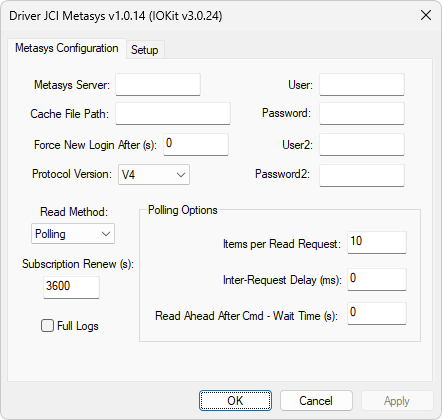
Metasys Configuration tab
The available options on this tab are described on the next table.
Available options on the Metasys Configuration tab
Option |
Description |
|---|---|
Metasys Server |
DNS (Domain Name Server) or IP address of a Metasys server or NAE concentrator |
User e Password |
User name and password for login |
User2 e Password2 |
User name and password for an alternative login in case of failure of the user indicated in the User and Password options. This alternative login happens after 2 (two) login retries |
Cache File Path |
Name of a directory to save and read files with cache and meaning of enumerations. The available files are GUID Files (MetasysGUID.txt): Contain internal codes of each Metasys object, stored in cache files to accelerate the initialization process, Cache Files for Commands and Statuses (DeviceName_MetasysStateCache.txt): Contain the meaning of statuses and commands of Tags with the N1 parameter greater than 0 (zero), stored in a cache file per NAE concentrator to accelerate the process of initialization and translation of meanings to values 0 (zero) and 1 (one), and Files for Names of Statuses (MetasysState0.txt and MetasysState1.txt): Contains the names of statuses that correspond to values 0 (zero) and 1 (one), respectively. If no directory is informed, these files are saved on the same folder of the .dll file off this Driver |
Force New Login After (s) |
Forces a new login regardless of the expiration date of a token. Configuring this option as 0 (zero) disables a new login |
Protocol Version |
Version of protocol used by this Driver. The available values for this option are V3: Uses only reading by polling or V4: Allows reading by polling and by events or subscriptions |
Reading method. The available values for this option are ByTag(N2): Allows selecting, in the N2 parameter of a Tag, if a reading is by polling or by event (this value can only be used if the Protocol Version option is configured with the value V4), Events: Performs a reading of Tags by subscription (this value can only be used if the Protocol Version option is configured with the value V4), or Polling: Performs a reading of Tags by polling (this value can be used with both values V3 and V4 in the Protocol Version option) |
|
Subscription Renew (s) |
When selecting a reading method of a Tag by events, a new subscription is performed if the value of this Tag does not change inside that time interval, in seconds, which forces an update of this Tag. If the received value is the same as the existing one, this Tag is not updated, except if the EnableDeadBand property is configured as False |
Full Logs |
Informs whether the logs of this Driver, when enabled, are generated with detailed I/O information |
Indicates the maximum number of items that can be requested at each communication request. The minimum value of this option is 1 (one). This option is also used in subscriptions of events to define the number of items that can be subscribed in a single message |
|
Polling Options - Inter-Request Delay (ms) |
Informs a default delay time, in milliseconds, between reading requests for all NAE concentrators. This value is used if a NAE concentrator does not have a delay time informed in the InterReqDelayMS Tag |
Informs a delay time, in seconds, to perform a reading of a status Tag linked to a command. This link is performed in the file MetasysReadAhead.txt |
In addition to the properties window, these settings can also be defined at run time in Elipse E3, Elipse Power, or Elipse Water applications. To do so, start this Driver in Offline mode, that is, execute an application with the Start driver OFFLINE option enabled, which is configured on the Setup tab of the properties window. The configuration options of this Driver are described on the next table.
Configuration options for JCI Metasys Driver
Parameter |
Offline String |
Data Type |
Description |
|---|---|---|---|
Metasys Server |
Metasys.UseChecksum |
Text |
Name of a Metasys server |
User |
Metasys.User |
Text |
User for login |
Password |
Metasys.Password |
Text |
Password for login |
Cache File Path |
Metasys.GUIDPath |
Text |
Cache directory |
Items per Read Request |
Metasys.MaxItemsRead |
Text |
Maximum number of items per reading request |
Protocol Version |
Metasys.APIVersion |
DWord |
Version of protocol. Possible values are 3 (three) or 4 (four) |
Read Method |
Metasys.ReadConfig |
DWord |
Reading method. Possible values are 0: By polling, 1: By events, or 2: By Tag |
Inter Request Delay |
Metasys.InterReqDelay |
Dword |
Delay time between readings |
Force New Login after (s) |
Metasys.ForceLoginTime |
Dword |
Forces a new login after n seconds |
Force New Login after consec errors |
Metasys.ForceLoginConsecErrors |
Dword |
Forces a new login after n consecutive errors |
Force New Login with read error rate |
Metasys.ForceLoginReadErrorRate |
Dword |
Forces a new login if the failure rate is higher than n |
Read Ahead After Cmd - Wait Time |
Metasys.ReadAheadWaitTime |
Dword |
Delay time for a status reading after a command |
Full Logs |
Metasys.FullLogs |
Int |
Enable full logs |
These properties can be written by using a Tag with the N1 parameter equal to -1 (minus one), the N2 parameter equal to 0 (zero), the N3 parameter equal to 0 (zero), and the N4 parameter equal to 3 (three).