All configurations are performed on the configuration window of this Driver. The Mitsubishi MelsecQ Driver, when added to an application, is loaded with its default configuration of extra parameters for an Ethernet interface, that is, TCP/IP port 5001 and a time-out of 1000 milliseconds. Users must configure a valid main IP address referring to a device to access.
For more information about the Setup and Ethernet tabs, please check topic Documentation of I/O Interfaces.
The MelsecQ tab, shown on the next figure, contains specific configurations for this Driver.
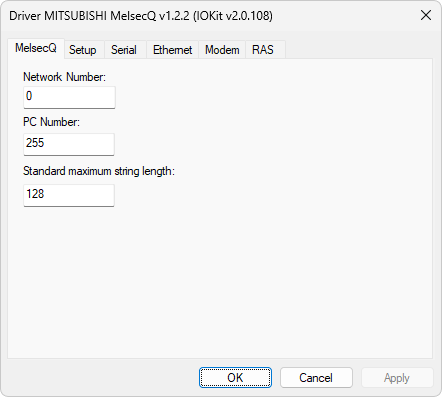
MelsecQ tab
The available options on this tab are described on the next table.
Available options on the MelsecQ tab
Option |
Description |
|---|---|
Network Number |
Network number of a remote device, between 0 (zero) and 255. If this is a local connection, then this value must be equal to 0 (zero, default) |
PC Number |
PC number of a remote device, between 0 (zero) and 64, or 255 for a local PC (default) |
Standard maximum string length |
Maximum default size of a String-type variable. The default value is 128 and it may range between 1 (one) and 128 |