The configuration parameters for communicating with a device are available on the properties window of this Driver, shown on the next figure. In addition to this properties window, these settings can also be defined at run time in Elipse E3, in Elipse Power, or in Elipse Water applications by starting this Driver in Offline mode, that is, by selecting the Start driver OFFLINE option on the Setup tab.
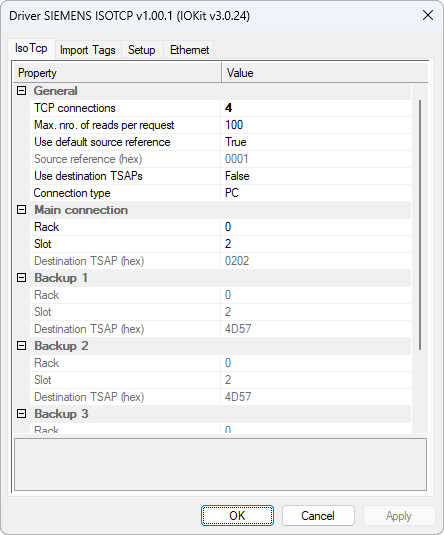
IsoTcp tab
The available options on this tab are described on the next table.
Configuration options of Siemens ISO-on-TCP Driver
Parameter |
Offline String |
Data Type |
Description |
|---|---|---|---|
Connection type |
ISOTCP.ConnectionType |
Number |
Type of S7 connection. Valid values are 0: PG (Programming Device), 1: OP (Operator Panel), or 2: PC (Standard) |
TCP connections |
ISOTCP.TCPConnections |
Number |
Number of simultaneous TCP connections to the main device. Valid values are in the range between 1 (one, default) and 8 (eight). Multiple connections increase reading throughput by executing requests in parallel |
Max. nro. of reads per request |
ISOTCP.MaxReadPerRequest |
Number |
Maximum number of variables grouped into a single S7 reading request. Valid values are in the range between 1 (one) and 100 (default). Reduce this value if a device reports errors of exceeded PDU |
Use default source reference |
ISOTCP.UseDefaultSourceReference |
Number |
Uses the default protocol source reference. Valid values are 0: Disabled (uses the value configured in the Source reference (hex) parameter) or 1: Enabled (default) |
Source reference (hex) |
ISOTCP.SourceReference |
Text |
Source reference of ISO connection, in hexadecimal, with up to 4 (four) digits. This parameter is used only when the Use default source reference parameter is disabled. The default value of this parameter is 0001 |
Source TSAP (hex) |
ISOTCP.SourceTSAP |
Text |
Source TSAP (Transport Service Access Point) of an ISO connection, in hexadecimal, with up to 4 (four) digits. The default value of this parameter is 0100. On most devices, this default value does not need to be changed |
Rack |
ISOTCP.CPURack |
Number |
Rack number of the main CPU. Valid values are in the range between 0 (zero, default) and 7 (seven). This parameter is used to calculate the destination TSAP when the Use destination TSAPs parameter is disabled |
Slot |
ISOTCP.CPUSlot |
Number |
Slot number of the main CPU. Valid values are in the range between 1 (one) and 31. The default value of this parameter is 2 (two, default slot for S7-300 or 400 devices). For S7-1200 and S7-1500 devices, use slot 1 (one) |
Use destination TSAPs |
ISOTCP.UseDestTSAP |
Number |
When enabled, the destination TSAPs are informed manually instead of calculated based on Rack and Slot parameters. Valid values are 0: Disabled (default, TSAP calculated based on Rack, Slot, and Connection type parameters) or 1: Enabled (uses values from the Destination TSAP (hex) parameter) |
Destination TSAP (hex) |
ISOTCP.DestTSAP |
Text |
Destination TSAP of the main CPU, in hexadecimal, with up to 4 (four) digits. This parameter is Used only when the Use destination TSAPs parameter is enabled. The default value of this parameter is 0202 |
Enable CPU Backup |
ISOTCP.EnableCPUBackup |
Number |
Enables the configuration of a backup or redundancy device. Valid values are 0: Disabled (default) or 1: Enabled (the IP address of a backup device is configured in the Backup IP option on the Ethernet tab) |
Rack (Backup 1) |
ISOTCP.CPUBackupRack |
Number |
Rack number of backup CPU 1 (one). Valid values are in the range between 0 (zero, default) and 7 (seven) |
Slot (Backup 1) |
ISOTCP.CPUBackupSlot |
Number |
Slot number of backup CPU 1 (one). Valid values are in the range between 1 (one) and 31. The default value of this parameter is 2 (two) |
Destination TSAP Backup (hex) |
ISOTCP.DestTSAPBackup |
Text |
Destination TSAP of backup device 1 (one), in hexadecimal. This parameter is used only when the Use destination TSAPs parameter is enabled. The default value of this parameter is 4D57 |
Enable CPU Backup 2 |
ISOTCP.EnableCPUBackup2 |
Number |
Enables the configuration of a second backup device. Valid values are 0: Disabled or 1: Enabled |
Rack (Backup 2) |
ISOTCP.CPUBackup2Rack |
Number |
Rack number of backup CPU 2 (two). Valid values are in the range between 0 (zero, default) and 7 (seven) |
Slot (Backup 2) |
ISOTCP.CPUBackup2Slot |
Number |
Slot number of backup CPU 2 (two). Valid values are in the range between 1 (one) and 31. The default value of this parameter is 2 (two) |
Destination TSAP Backup 2 (hex) |
ISOTCP.DestTSAPBackup2 |
Text |
Destination TSAP of backup device 2 (two), in hexadecimal. This parameter is used only when the Use destination TSAPs parameter is enabled. The default value of this parameter is 4D57 |
Enable CPU Backup 3 |
ISOTCP.EnableCPUBackup3 |
Number |
Enables the configuration of a third backup device. Valid values are 0: Disabled or 1: Enabled |
Rack (Backup 3) |
ISOTCP.CPUBackup3Rack |
Number |
Rack number of backup CPU 3 (three). Valid values are in the range between 0 (zero, default) and 7 (seven) |
Slot (Backup 3) |
ISOTCP.CPUBackup3Slot |
Number |
Slot number of backup CPU 3 (three). Valid values are in the range between 1 (one) and 31. The default value of this parameter is 2 (two) |
Destination TSAP Backup 3 (hex) |
ISOTCP.DestTSAPBackup3 |
Number |
Destination TSAP of backup device 3 (three), in hexadecimal. This parameter is used only when the Use destination TSAPs parameter is enabled. The default value of this parameter is 4D57 |
All offline properties must be configured via PLC Tags in String format using the N1 parameter equal to -1 (minus one), the N2 parameter equal to 0 (zero), the N3 parameter equal to 0 (zero), and the N4 parameter equal to 3 (three). For more information and examples, please check topic Documentation of I/O Interfaces.