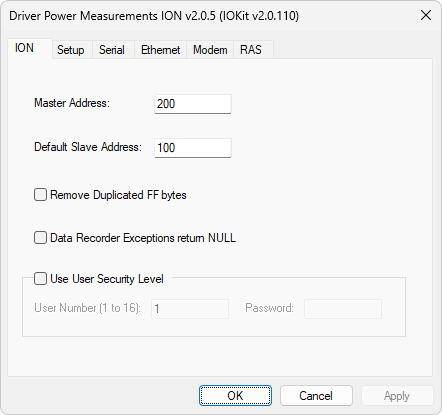
Driver configuration window
The available options on the ION tab are described on the next table.
Available options on the ION tab
Option |
Description |
|---|---|
Source address, that is, the address assigned to this Driver on the network. It must not match the addresses of meters available on the network (Slave Id) |
|
Identifies the address of a meter if the N1 or B1 parameter of a Tag is configured with the value 0 (zero) |
|
Removes unwanted FF bytes appearing at the beginning of a frame as a result of a carrier switching if a dedicated communication channel gets noisy |
|
Returns NULL and not the text or description of an exception informed by a meter during the memory extraction of a data recorder, or mass memory reading |
|
Configures this Driver to perform a control on alphanumerical passwords of users |
|
User number, between 1 (one) and 16, used by this Driver if the Use User Security Level option is enabled |
|
Alphanumerical password, with up to 6 (six) characters, for the user informed in the User Number (1 to 16) option |
For more information about the configuration of Setup, Serial, Ethernet, Modem, and RAS tabs, please check topic Documentation of I/O Interfaces.