The properties window of this Driver contains the IEC103 tab, shown on the next figure.
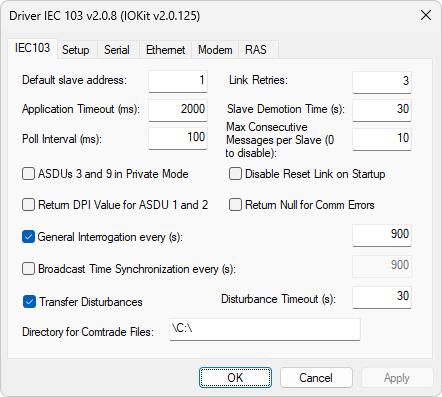
IEC103 tab
The available options on this tab are described on the next table.
Available options on the IEC103 tab
Option |
Description |
|---|---|
Default slave address |
This address is used as the address of a device whenever N1 or B1 parameters are configured with the value 0 (zero) |
Link Retries |
Number of internal communication retries. If after that number of retries there is no response from a device, then that device is configured to an Inactive status |
Application Timeout (ms) |
Time-out for a command response, used for commands from ASDUs 6 (six) and 20 |
Slave Demotion Time (s) |
When a device is in an Inactive status, this Driver tries to restart communication again at the time intervals defined in this option. If there is an answer, this device goes to an Active status and, otherwise, it remains in an Inactive status until the next try |
Poll Interval (ms) |
Time, in milliseconds, to wait for a scan among devices in a network. This Driver requests, based on this interval, all addressed devices, that is, the ones containing at least one Tag addressed in an application |
Max Consecutive Messages per Slave (0 to disable) |
When scanning a device, this Driver tries to consume all messages that must be received. To avoid this Driver to remain a long time processing a single device, users can specify in this option a maximum number of messages to swap at each polling per device. NOTE: If this Driver is receiving a disturbance to generate a file in COMTRADE format, this limit is not respected, that is, that disturbance is received up to the end and then the polling moves to the next device |
If this option is NOT selected, this Driver only considers the Function Type to store data. If this option is selected, this Driver stores the value of an ASDU based on Function Type plus Information Number. For each combination Function Type × 256 + Information Number, this Driver stores a sequence of up to 16 values, which can be accessed using the N4 parameter from 0 (zero) to 15 |
|
Disable Reset Link on Startup |
Disables sending a Reset Link message when starting communication |
Return DPI Value for ASDU 1 and 2 |
When selecting this option, this Driver returns to Tags mapped to ASDUs 1 (one) and 2 (two) the same value received in the DPI (Double Point Information) property, which corresponds to values 0 (zero), 1 (one), 2 (two), or 3 (three). If this option is not selected, it keeps the previous behavior from version 1.0, which returns values 0 (zero) or 1 (one), that is, as a simple point |
Return Null for Comm Errors |
Select this option to return a Null value and a bad quality to Tags when in communication error. If this option is not selected, Tags keep their last value and a bad quality in that same situation |
General Interrogation every (s) |
Enables requesting a cyclic General Interrogation by this Driver, for the purpose of checking the consistency of a real-time database |
Broadcast Time Synchronization every (s) |
Enables sending cyclic syncing messages using the address FF (Broadcast) |
Transfer Disturbances |
Enables receiving disturbances for all devices |
Disturbance Timeout (s) |
Maximum time-out for ASDUs 26, 27, 28, and 31, which indicate the end of the receiving process of several parts needed to generate a file in COMTRADE format. The default value of this option is 30 seconds |
Directory for Comtrade Files |
Default directory in which users must save disturbance files |