Performs configurations when the selected transport layer is XMPP. The implementation of XMPP transport layer allows a reliable, secure and adaptable communication, especially in systems that require real-time data exchange, such as applications for substation automation according to IEC 61850-8-2 standard.
For a connect between an IEC 61850 Server and Client over XMPP, there must be at least one XMPP Server, such as Ejabberd or OpenFire. Each IEC 61850 Client or Server must first connect to an XMPP Server using an account, known as JID (Jabber ID), in the format jidname@dnsname/IEC or jidname@serverIP/IEC, such as "client@myxmppserver.org/IEC", and a password.
Each JID account has an associated Roster, which is a list maintained on the XMPP Server of other JIDs whose communication is enabled or authorized. Each JID account is also organized in the XMPP Server into a group. In the IEC 61850 standard, the name of this group must be equal to "61850".
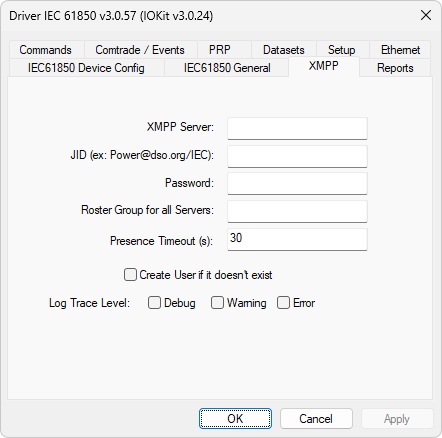
XMPP tab
The available options on the XMPP tab are described on the next table.
Available options on the XMPP tab
Option |
Description |
|---|---|
XMPP Server |
IP or DNS address of an XMPP Server |
JID |
Jabber ID used by this Driver to connect to an XMPP Server |
Password |
Password associated with a Jabber ID |
Roster Group for all Servers |
The default value of this option is "61850" |
Presence Timeout (s) |
Defines a default interval to detect the presence of communication. After that interval, Tags are notified with bad quality |
Accept all clients |
Allows any Client to connect, even if a JID is not in a Roster. This option is not recommended for production environments |
Create User if it doesn't exist |
Allows creating a user dynamically, if they do not exist. This option is only effective if an XMPP Server allows that type of operation and it is not recommended for production environments |
Log Trace Level |
Select the type of XMPP messages for logs, Debug, Warning, or Errors |