This configuration also allows a connection with more than one Hitachi PLC, but uses LINK modules instead of COMM modules. The network structure is also different, as shown on the next figure.
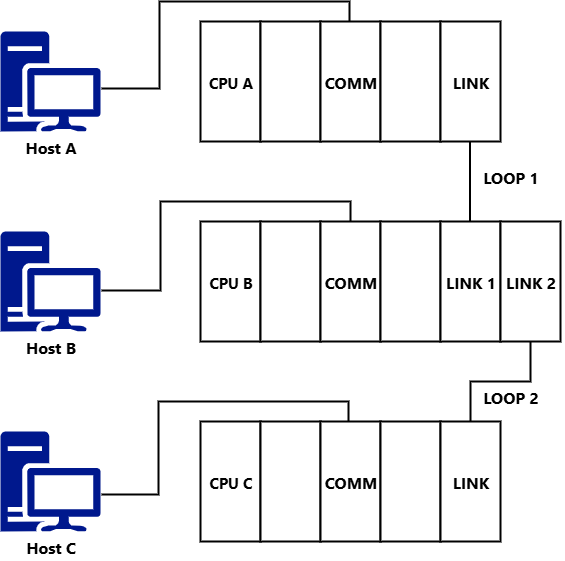
PLC network with LINK modules
Addressing, in this case, is by using a LUMP number, which represents the following information:
•L: Loop Number
•U: Unit Number
•M: Module Number
•P: Port Number
The values to use for each one of these numbers are described on the next table.
Values for a LUMP number
Value |
Description |
|---|---|
L |
Possible values are 1: The destination PLC is in Link 1 (one), 2: The destination PLC is in Link 2 (two), or FFH: The destination PLC is the CPU where the computer is connected |
U |
Possible values are Station Number: The destination PLC is on a remote station or FFH: The destination PLC is the CPU where the computer is connected |
M |
This value is always equal to 00H |
P |
This value is always equal to 00H |
In the example of the previous figure, the addressing is described on the next table.
Addressing of a LUMP number
|
L |
U |
M |
P |
|---|---|---|---|---|
Host A => CPU B |
01H |
01H |
00H |
00H |
Host B => CPU A |
01H |
00H |
00H |
00H |
Host B => CPU C |
02H |
01H |
00H |
00H |
Host C => CPU B |
01H |
00H |
00H |
00H |
Host A => CPU A |
FFH |
FFH |
00H |
00H |
Host B => CPU B |
FFH |
FFH |
00H |
00H |
Host C => CPU C |
FFH |
FFH |
00H |
00H |
Not all models of the H Series allow the architecture presented on the previous table. Please check a Hitachi dealer for more information.