The [P] configuration parameters are not used. All settings are performed on this Driver's configuration dialog box. For more information about the Setup, Serial, Ethernet, Modem, and RAS tabs, please check topic Documentation of I/O Interfaces.
The ElgamaEPQS tab, shown on the next figure, contains specific configurations for this Driver.
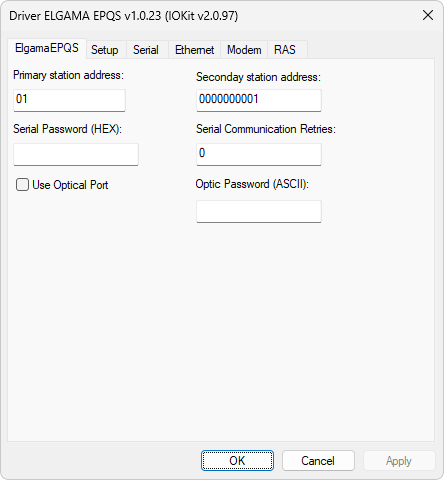
ElgamaEPQS tab
The available options on this tab are described on the next table.
Available options on ElgamaEPQS tab
Option |
Description |
|---|---|
Primary station address |
Address of the primary station |
Secondary station address |
Address of the secondary station, usually printed on a device's front side |
Password used for authentication on a device when the optical port is not used |
|
Indicates whether this Driver must use the protocol of the optical port |
|
Password used for the optical port |