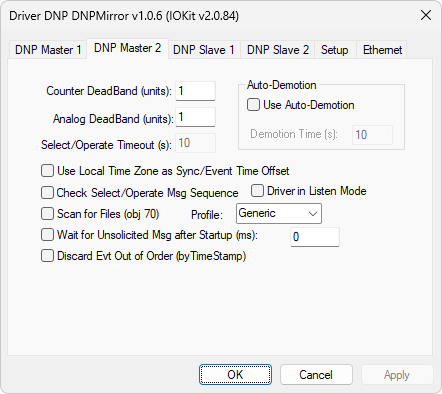
DNP Master 2 tab
The available options on this tab are described on the next table.
Available options on the DNP Master 2 tab
Option |
Description |
|---|---|
Counter DeadBand (units) |
Dead band, in units, during the verification for new events for counters |
Analog DeadBand (units) |
Dead band, in units, during the verification for new events for analog points |
Select/Operate Timeout (s) |
Maximum time for blocking other messages, except the Operate message, right after a Select command |
Use Auto-Demotion |
Enable the auto-demotion system, which automatically remove from and insert into communication the Slaves that are in the Inactive status, that is, with communication error. This procedure is used when two or more Slaves use the same channel, thus avoiding that a Slave in that status monopolize the usage of a channel |
Time, in seconds, that this Driver tries to communicate with each Slave in the Inactive status, to check whether communication is performing normally, setting this Slave back to the Active status |
|
Use Local Time Zone as Sync/Event Time Offset |
Instructs this Driver to consider the difference between Windows official time and UTC (Coordinated Universal Time) or GMT (Greenwich Mean Time) time for all events and requests for clock syncing. This function is useful when the DNP's Server-side has its time in UTC but users must inform the local relative time to an application |
Check Select/Operate Msg Sequence |
Allows using Operate commands controlling the sequence number of a message so that it is immediately after the Select command. When selecting this option, this Driver does not send any command, except the Operate command, until a maximum time for an operation is exceeded |
Driver in Listen Mode |
In this mode, this Driver does not transmit any data, but it can interpret responses received by a communication sniffer between other Masters and a Slave |
Scan for Files (obj 70) |
Indicates that this Driver must try to perform file transfers from a device. Users must select a collecting profile. Currently, only the Pextron profile is supported |
Profile |
Collecting profile. The available options are Generic or Pextron |
Wait for Unsolicited Msg after Startup (ms) |
Indicates how much time this Driver must wait for unsolicited messages after connection, aiming to retrieve recent events before performing an integrity request, or Class 0 (zero). Thus, points with events receive a quality 192 and the correct timestamp, because in the integrity response the object do not have a timestamp |
Discard Evt Out of Order (by TimeStamp) |
For objects with information about timestamp, this option allows events whose timestamp is older than the last processed event are discarded |