Before using this Driver, users must configure the options on the DDEClient tab, shown on the next figure.
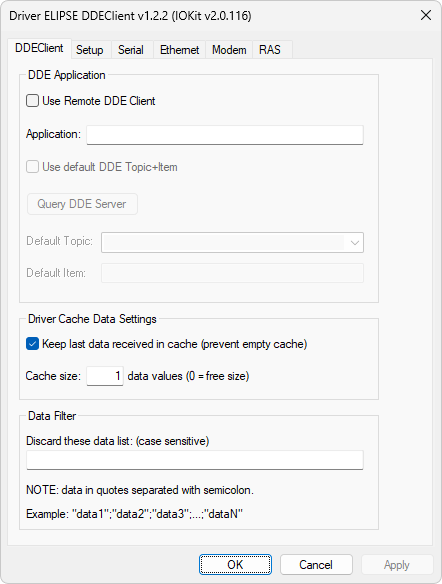
DDEClient tab
The available options on this tab are described on the next table
Available options on the DDEClient tab
Option |
Description |
|---|---|
Application |
Name of an application supporting DDE server functions |
Use default DDE Topic + Item |
If this option is enabled, this Driver uses the values of Default Topic and Default Item options when an application Tag does not inform any data for the Device and Item parameters, respectively |
Query DDE Server |
Use this option to query all topics available on a DDE server |
Default Topic |
Defines a default topic to use if an application Tag does not inform any data for the Device parameter |
Default Item |
Defines a default item to use if an application Tag does not inform any data for the Item parameter |
Keep last data received in cache |
If this option is enabled, all values in the cache memory are read, but always preserving the last value before clearing the cache memory of this Driver. If this option is not enabled, all values in the cache memory are read, and a possible lack of data may occur when that memory is completely empty, changing the quality of a PLC Tag to Bad |
Cache size |
Defines the maximum amount of data stacked in the cache memory of this Driver. If this option is configured with a value of 0 (zero), the cache memory has no limits for stacking data |
Discard these data list |
Defines all data to discard by this Driver, considering uppercase and lowercase letters to identify data |