The configuration parameters for communication with a Schneider Data Logger 4G LTE IoT device are available on the Properties Window of this Driver, shown on the next figure.
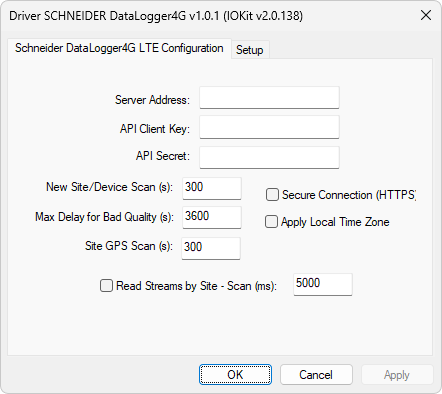
Properties window
The available options on the Schneider DataLogger4G LTE Configuration tab are described on the next table.
Available options on the Schneider DataLogger4G LTE Configuration tab
Option |
Description |
|---|---|
Server Address |
Indicates the IP address or URL of a Schneider server, such as "10.196.5.4" |
API Client Key |
Key to access the API (Application Programming Interface), which must be registered on the API Clients - Generate API Key tab on the Schneider DataLogger 4G server's site |
API Secret |
Secret linked with the access key to the API |
New Site/Device Scan (s) |
Time interval used to update the internal database of sites and devices, allowing new Tags to be added while applications are executing. Leave this value in 0 (zero) to disable that interval |
Max. Delay for Bad Quality (s) |
Maximum delay, in seconds, for an old measurement to be considered with a bad quality |
In case of using special Tags for latitude and longitude from a site, this option informs the update interval of that information |
|
Secure Connection (HTTPS) |
If a Schneider server is cloud-based, enable this option to use the HTTPS protocol instead of the HTTP protocol |
Apply Local Time Zone |
Timestamps received from a Schneider server are usually in UTC (Coordinated Universal Time) format. Select this option to convert to the local timezone |
Read Streams by Site - Scan (ms) |
Each device has a set of streams linked, which are historical series corresponding to the Tags read. These streams can be read grouped by site or individually. Select this option to read the streams by site and define an interval, in milliseconds, for that reading. In this case, the first reading operation after the initialization of this Driver requests data from the current day, and then new data is requested starting from the newest timestamp received from the previous reading. Leave this option deselected to read streams individually, requesting in this case only the last value at each reading. The reading interval in this case is the interval defined in the Scan property, in milliseconds, of each Tag |
In addition to this Property Window, these configurations can also be defined at run time in Elipse E3, Elipse Power, or Elipse Water applications. To do so, start this Driver in Offline mode, that is, execute an application with the Start driver OFFLINE option enabled, configurable on the Setup tab of the Properties Window. The configuration options of this Driver are described on the next table.
Configuration options of Schneider Data Logger 4G Driver
Parameter |
Offline String |
Data Type |
|---|---|---|
Server Address |
DataLogger4G.ServerAddress |
String |
API Client Key |
DataLogger4G.APIClientKey |
String |
API Secret |
DataLogger4G.APISecret |
String |
New Site/Device Scan (s) |
DataLogger4G.NewSiteScanS |
Number |
Use Secure Connection |
DataLogger4G.UseHTTPS |
Number. Possible values are 0 (zero) or 1 (one) |
Read Streams by Site |
DataLogger4G.ScanbySite |
Number. Possible values are 0 (zero) or 1 (one) |
Site Scan (ms) |
DataLogger4G.SiteScanMS |
Number |
Apply Local Time Zone |
DataLogger4G.ApplyLocalTZ |
Number. Possible values are 0 (zero) or 1 (one) |
All properties in Offline mode must be configured via PLC Tags in String format using the N1 parameter equal to -1 (minus one), the N2 parameter equal to 0 (zero), the N3 parameter equal to 0 (zero), and the N4 parameter equal to 3 (three). For more details and examples, please check topic Documentation of I/O Interfaces.