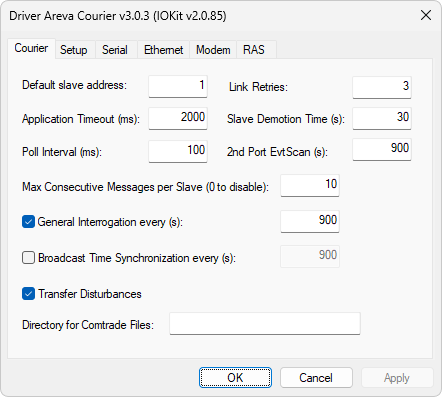
Courier tab
The available options on this tab are described on the next table.
Available options on the Courier tab
Option |
Description |
|---|---|
Default slave address |
This address is used as the address of a device whenever the value of the N1 or B1 parameter is equal to 0 (zero) |
Application Timeout (ms) |
Time-out for the response of a command |
Poll Interval (ms) |
Time-out, in milliseconds, for a scan among devices of a network. This Driver scans, based on this time-out, all addressed devices, that is, the ones that contain at least one addressed Tag in an application |
Link Retries |
Number of internal communication retries. If after that number of retries there is no response from a device, then this device is set to the Inactive status |
Slave Demotion Time (s) |
When a device is in the Inactive status, this Driver tries to set this device into communication again at the time intervals defined in this option. If there is a response, this device is set to the Active status, otherwise it remains in the Inactive status until the next try |
2nd Port EvtScan (s) |
Scan time, in seconds, of events using the secondary port. The default value of this option is 30 seconds, and oscillography collecting is fixed as 2 (two) times the time defined in this option |
Max Consecutive Messages per Slave (0 to disable) |
When scanning a device, this Driver tries to consume all messages that must be received. To avoid that this Driver remains a long time stuck in a single device, users can specify in this option a maximum number of messages exchanged at each polling per device |
General Interrogation every (s) |
Enables a request for a cyclic general interrogation by this Driver, aiming a check on consistency of real-time database |
Broadcast Time Synchronization every (s) |
Enables sending cyclic syncing messages using the FF (broadcast) address |
Transfer Disturbances |
Enables receiving oscillography data for all devices |
Directory for Comtrade Files |
Default directory for saving oscillography files |
NOTE |
If this Driver receives oscillography data to generate a file in COMTRADE format, the value of the Max Consecutive Messages per Slave (0 to disable) option is not respected, that is, oscillography data is completely received and then polling moves to the next device. |