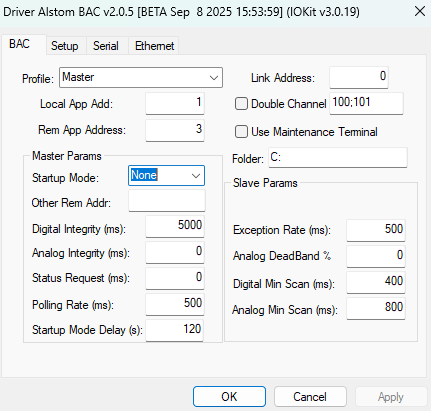
BAC tab
The available options on this tab are described on the next table.
Available options on the BAC tab
Option |
Description |
|---|---|
Profile |
Operation mode of this Driver. Possible values are: Master: Driver will the the Master in a connection with a BAC Slave Master by Files: Driver will behave as a master, but data will be collected from Prodix System Log Files Slave: Driver will be the Slave in a connection with a BAC Master (ex: OCC) Slave Ebilock: Driver will be the Slave in a connection with a BAC Master using Ebilock profile Master&Slave Listen Mode: Driver will behave as a Master, but in listen mode (no data send), only processing TX and RX messages exchanged between a Master and a Slave. Slave Listen Mode: Driver will behave as a Master, but in listen mode (no data send), processing only RX messages exchanged between a Master and a Slave. |
Link Address |
Address of the data link |
Local App Add |
Local address of a station or UTR, according to the operation mode used |
Rem App Address |
Address of a station or UTR, acording to the operation mode used. The Local and Remote addresses must be in Decimal format |
Double Channel Support |
Enables support for communication using two I/O ports, Serial or Ethernet. This option is used in cases that require redundancy of channel. At the right side, it is possible to inform up to 2 addresses (one for each channel) separated by a semi colon, representing different destination addresses at the responses. Ex: "100;200" (without quotes).
If the driver is using Master profile using Ethernet, the destination IP/Port of the first channel shall be informed at the Ethernet page, fields Main IP/Main Port, and the secondary channel (if this option is enabled) at the fields Backup IP 1 and Backup Port 1. |
Use Maintenance Terminal |
Indicates the use of a data terminal as the origin, which inserts 2 (two) more bytes in the communication |
Folder |
In the Master by Files operation mode, indicates the directory where files are retrieved |
Master Params - Startup Mode |
Defines if at driver startup or reconnection, a start mode message shall be sent. The options are: None (no command is sent), Central (C0DCh), Local (C0DDh) or Maintenance (C0DEh). |
Master Params - Other Rem Addr |
Allows the definition of a list of addresses separated by semicolons, beyond what has been defined at "Rem App Address" field. Example, the driver (as a master) needs to talk with RTU´s 2,5,6 and 7. In this case, Rem App Address = "2", and this field should be set to "5;6;7". |
Master Params - Digital Integrity (ms) |
Interval to request digital data in Master mode, in milliseconds |
Master Params - Analog Integrity (ms) |
Interval to request analog data in Master mode, in milliseconds |
Master Params - Status Request (ms) |
Interval to request status in Master mode, in milliseconds |
Master Params - Polling Rate (ms) |
Interval for polling, or search by events or changes, in Master mode, in milliseconds |
Slave Params - Other Local Addr |
Allows the definition of a list of addresses separated by semicolons, beyond what has been defined at "Local App Address" field. Example, the driver (as a slave) will represent RTU´s 2,5,6 and 7. In this case, Local App Address = "2", and this field should be set to "5;6;7". |
Slave Params - Exception Rate (ms) |
Minimum interval for sending exceptions in Slave mode, in milliseconds |
Slave Params - Analog DeadBand % |
Dead band as a percentage to consider an analog change in Slave mode |
Slave Params - Digital Min Scan (ms) |
Minimum interval for checking digital changes, to avoid overloading a channel, in Slave mode, in milliseconds |
Slave Params - Analog Min Scan (ms) |
Minimum interval for checking analog changes, to avoid overloading a channel, in Slave mode, in milliseconds |